Mastering Django GeneratedField with examples

Django GeneratedField
class GeneratedField(*, expression, output_field, db_persist, **kwargs)
Django 5.0 introduced the GeneratedField , a powerful feature that allows developers to define database columns whose values are automatically computed from other fields. Unlike properties or methods in Python, GeneratedField values are generated at the database level, improving performance and enabling querying. In this post, we’ll explore practical examples of GeneratedField with JSON, Boolean, String and Integer outputs, and discuss key considerations to avoid pitfalls.
GeneratedField is always computed based on other fields in the model. This field is managed and updated by the database itself. Uses the GENERATED ALWAYS SQL syntax.
There are two kinds of generated columns: stored and virtual. A stored generated column is computed when it is written (inserted or updated) and occupies storage as if it were a regular column. A virtual generated column occupies no storage and is computed when it is read. Thus, a virtual generated column is similar to a view and a stored generated column is similar to a materialized view.
There are many database-specific restrictions on generated fields that Django doesn’t validate and the database may raise an error e.g. PostgreSQL requires functions and operators referenced in a generated column to be marked as IMMUTABLE.
You should always check that expression is supported on your database. Check out MariaDB , MySQL , Oracle , PostgreSQL , or SQLite docs.
Changed in Django 6.0: GeneratedField are now automatically refreshed from the database on backends that support it (SQLite, PostgreSQL, and Oracle) and marked as deferred otherwise.
Example 1: Get a person's full name and initials
Next up, here's an example of how to use GeneratedField to automatically concatenate strings from different fields.
# models.py
from django.db import models
from django.db.models.functions import Substr, Concat


class Person(models.Model):
    first_name = models.CharField(max_length=100)
    last_name = models.CharField(max_length=100)
    full_name = models.GeneratedField(
        expression=Concat('first_name', models.Value(' '), 'last_name'),
        output_field=models.CharField(max_length=200),
        db_persist=True
    )
    initials = models.GeneratedField(
        expression=Concat(
            Substr('first_name', 1, 1), Substr('last_name', 1, 1)),
        output_field=models.CharField(max_length=2),
        db_persist=True
    )
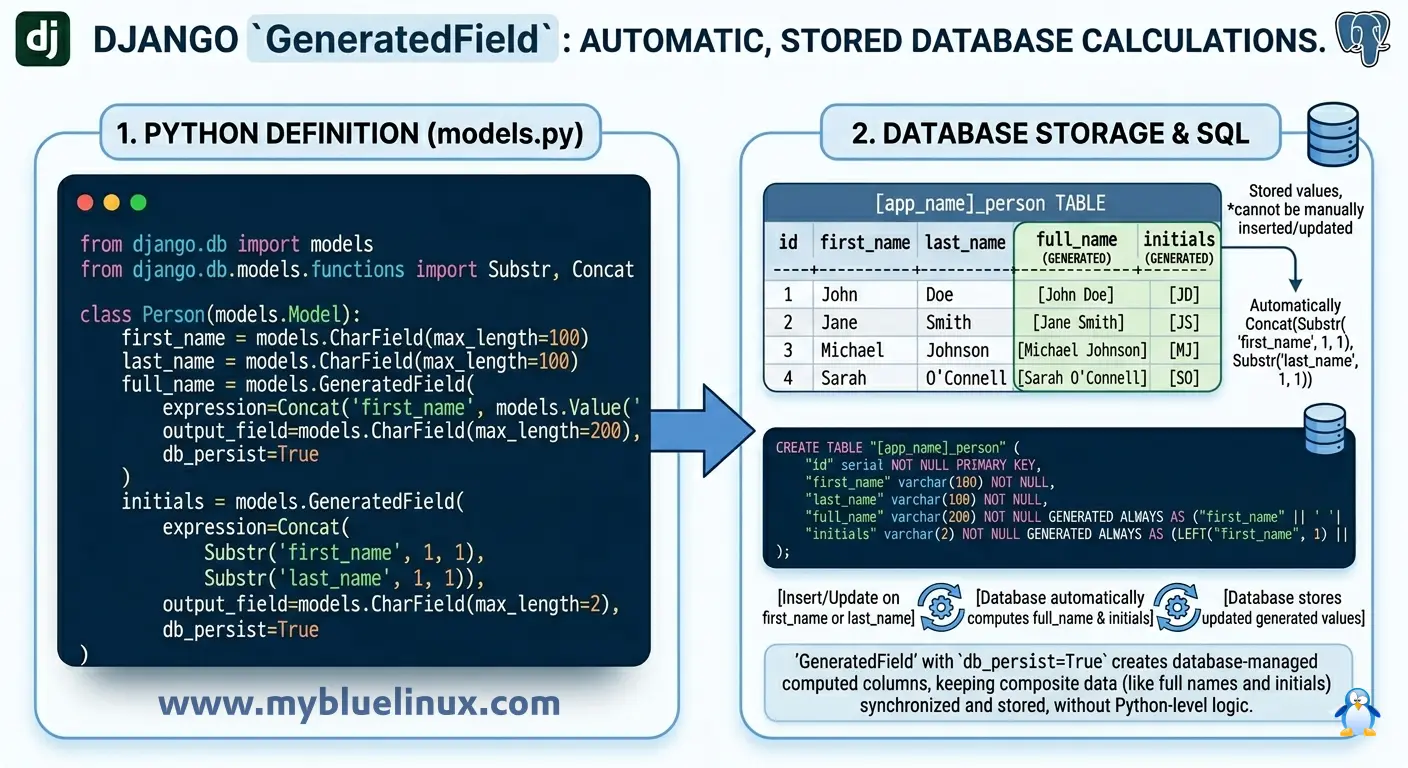
sample data:
# create Person objects
Person.objects.create(first_name='Robert', last_name='Katz')
Person.objects.create(first_name='Alexander', last_name='Henry')

# query data and output
Person.objects.all().values('full_name', 'initials')
<QuerySet [
    {'full_name': 'Robert Katz', 'initials': 'RK'},
    {'full_name': 'Alexander Henry', 'initials': 'AH'}
]>
Example 2: Calculate the day of the week and whether it's a weekend
Here's a simple example, which would have been very useful for when I was building schedules and calendars for one of my previous startups (HR tech). I used a combination of app code and fairly complex SQL to do date calculations. GeneratedField simplifies this a lot.
# models.py
from django.db import models
from django.db.models.functions import Extract


class Event(models.Model):
    start_time = models.DateTimeField()
    day_of_week = models.GeneratedField(
        expression=Extract('start_time', 'week_day'),
        output_field=models.IntegerField(),
        db_persist=True
    )
    is_weekend = models.GeneratedField(
        expression=models.Case(
            models.When(day_of_week__in=[1, 7], then=True),
            default=False,
            output_field=models.BooleanField(),
        ),
        db_persist=True,
        output_field=models.BooleanField(),
    )
data and queryset:
# Add a few events to the database:
from datetime import datetime
Event.objects.create(start_time=datetime(2022, 1, 1, 12, 0, 0)) # Saturday.
Event.objects.create(start_time=datetime(2022, 1, 2, 12, 0, 0)) # Sunday.
Event.objects.create(start_time=datetime(2022, 1, 3, 12, 0, 0)) # Monday.

# Query the model to show the calculated field:
Event.objects.all().values('day_of_week', 'is_weekend')
# output
<QuerySet [
    {'day_of_week': 7, 'is_weekend': True},
    {'day_of_week': 1, 'is_weekend': True},
    {'day_of_week': 2, 'is_weekend': False}
]>
note: SQL databases use 7 for Saturday, 1 for Sunday. So, 2 is Monday.
Example 3: Calculate exchange rates for a financial asset
Next up, here's an example of how to use django GeneratedField to calculate exchange rates automatically. This would have been useful for me when I was building a hedge fund's infrastructure.
class Asset(models.Model):
    ticker = models.CharField(max_length=10)
    price_eur = models.DecimalField(max_digits=10, decimal_places=2)
    eur_to_usd_exchange_rate = models.DecimalField(max_digits=5, decimal_places=2, default=1.1)
    price_usd = models.GeneratedField(
        expression=models.F("price_eur") * models.F("eur_to_usd_exchange_rate"),
        output_field=models.DecimalField(max_digits=12, decimal_places=2),
        db_persist=True
    )
Add Data and Query:
# Insert products into the database:
Asset.objects.create(ticker='MSFT', price_eur=121.32, eur_to_usd_exchange_rate=1.1)
Asset.objects.create(ticker='GOOG', price_eur=2.23, eur_to_usd_exchange_rate=1.1)

# Query to see the calculated USD price:
Asset.objects.all().values('ticker', 'price_eur', 'price_usd')
# output:
<QuerySet [
    {'ticker': 'MSFT', 'price_eur': Decimal('121.32'), 'price_usd': Decimal('133.45')},
    {'ticker': 'GOOG', 'price_eur': Decimal('2.23'), 'price_usd': Decimal('2.45')}
]>
Example 4: Calculate employee duration of service
This shows how to use django model GeneratedField to calculate the duration of service for employees. Another example that would have been useful for me when building a previous product in HR tech to calculate employee length of service.
# models.py
class Employee(models.Model):
    hire_date = models.DateField()
    most_recent_work_date = models.DateField(null=True)
    service_period = models.GeneratedField(
        expression=models.F('most_recent_work_date') - models.F('hire_date'),
        output_field=models.DurationField(),
        db_persist=True
    )
Add Data and Query:
# add data
Employee.objects.create(hire_date=date(2010, 1, 1), most_recent_work_date=date(2030, 2, 1))
Employee.objects.create(hire_date=date(2026, 1, 10), most_recent_work_date=date(2026, 3, 2))

# query:
Employee.objects.values('hire_date', 'service_period')
# output:
<QuerySet [
    {'hire_date': datetime.date(2010, 1, 1), 'service_period': datetime.timedelta(days=7336)},
    {'hire_date': datetime.date(2026, 1, 10), 'service_period': datetime.timedelta(days=51)}
]>
Example 5: Calculate discounts based on purchase quantity
# models.py
from django.db import models
from django.db.models import Case, When, Value, BooleanField


class Order(models.Model):
    quantity = models.IntegerField()
    unit_price = models.DecimalField(max_digits=10, decimal_places=2)
    discount_per_unit = models.GeneratedField(
        expression=Case(
            When(quantity__gt=100, then=models.F("unit_price") * 0.1),
            default=Value(0),
            output_field=models.DecimalField(max_digits=12, decimal_places=2)
        ),
        db_persist=True,
        output_field=models.DecimalField(max_digits=12, decimal_places=2),
    )
    total_price = models.GeneratedField(
        expression=(models.F("quantity") * models.F("unit_price")) -
                   (models.F("quantity") * models.F("discount_per_unit")),
        output_field=models.DecimalField(max_digits=12, decimal_places=2),
        db_persist=True
    )
Add Data and Query:
# Add orders to your database and query for discounts:
Order.objects.create(quantity=150, unit_price=10)
Order.objects.create(quantity=50, unit_price=10)

# query:
Order.objects.all().values()
# output:
<QuerySet [
    {'id': 1, 'quantity': 150, 'unit_price': Decimal('10.00'), 'discount_per_unit': Decimal('1.00'), 'total_price': Decimal('1350.00')},
    {'id': 2, 'quantity': 50, 'unit_price': Decimal('10.00'), 'discount_per_unit': Decimal('0.00'), 'total_price': Decimal('500.00')}
]>
Example 6: Calculate Body Mass Index (BMI)
# models.py
class Patient(models.Model):
    weight_kg = models.FloatField()
    height_m = models.FloatField()
    bmi = models.GeneratedField(
        expression=models.F('weight_kg') / (models.F('height_m') * models.F('height_m')),
        output_field=models.FloatField(),
        db_persist=True
    )
Add Data and Query
# Add patient data to your database and query for BMI:
Patient.objects.create(weight_kg=70, height_m=1.75)

# query:
Patient.objects.all().values('bmi')
# output:
<QuerySet [{'bmi': 22.857142857142858}]>
Example 7: Calculate compound interest
Most people like the thought of their money growing exponentially. Here's an example of how to use GeneratedField to calculate compound interest.
# models.py
from django.db import models
from django.db.models.functions import Power


class Investment(models.Model):
    principal_amount = models.DecimalField(max_digits=10, decimal_places=2)
    annual_interest_rate = models.FloatField()
    years = models.IntegerField()
    future_value = models.GeneratedField(
        expression=models.ExpressionWrapper(
            models.F('principal_amount') * Power(models.F('annual_interest_rate') + 1, models.F('years')),
            output_field=models.DecimalField(max_digits=15, decimal_places=2)
        ),
        db_persist=True,
        output_field=models.DecimalField(max_digits=15, decimal_places=2),
    )
Add Data and Query
# Add investment data to your database and calculate the future value:
Investment.objects.create(principal_amount=1000, annual_interest_rate=0.05, years=10)

# query:
Investment.objects.all().values('future_value')
# output:
<QuerySet [{'future_value': Decimal('1628.89')}]>
Example 8: Combining Attributes to JSONField
Suppose we have a Product model with a JSONField storing attributes like color and size. We can use GeneratedField to create a new JSON object containing only these two attributes.
# models.py
from django.db import models
from django.db.models import F
from django.db.models.functions import JSONObject, KeyTextTransform

class Product(models.Model):
    attributes = models.JSONField()
    color_size = models.GeneratedField(
        expression=JSONObject(
            color=KeyTextTransform("color", F("attributes")),
            size=KeyTextTransform("size", F("attributes")),
        ),
        output_field=models.JSONField(),
        db_persist=True,  # Stored in the database
    )
- JSONObject constructs a JSON object by extracting color and size from the attributes JSONField.
- db_persist=True ensures the computed value is stored in the database for efficient querying.
Sample Data:
# sample data:
product = Product.objects.create(
    attributes={"color": "red", "size": "large", "weight": 500}
)

# print data:
print(product.color_size)
# output:
{"color": "red", "size": "large"}
Example 9: BooleanField Stock Status
For an e-commerce app, we can generate a boolean flag in_stock based on whether a product’s quantity is greater than zero.
# models.py
from django.db import models
from django.db.models import F, ExpressionWrapper

class Product(models.Model):
    quantity = models.IntegerField()
    in_stock = models.GeneratedField(
        expression=ExpressionWrapper(
            F("quantity") > 0,
            output_field=models.BooleanField(),
        ),
        output_field=models.BooleanField(),
        db_persist=True,
    )
- ExpressionWrapper wraps the boolean condition F("quantity") > 0 and explicitly sets the output type. ExpressionWrapper doc
- The database updates in_stock automatically when quantity changes.
Sample Data:
product = Product.objects.create(quantity=5)
print(product.in_stock)
# Output:
True

product.quantity = 0
product.save()
print(product.in_stock)
# Output:
False
Example 10: Dynamic Discount in IntegerField
Calculate a discount_percent based on whether a product is on sale.
# models.py
from django.db import models
from django.db.models import Case, When, Value

class Product(models.Model):
    is_on_sale = models.BooleanField(default=False)
    discount_percent = models.GeneratedField(
        expression=Case(
            When(is_on_sale=True, then=Value(20)),
            default=Value(0),
            output_field=models.IntegerField(),
        ),
        output_field=models.IntegerField(),
        db_persist=True,
    )
- Case and When create conditional logic: 20% discount if is_on_sale is True, else 0%.
- The value is computed at the database level, ensuring consistency.
Sample Data:
product = Product.objects.create(is_on_sale=True)
print(product.discount_percent)
# Output:
20

product.is_on_sale = False
product.save()
print(product.discount_percent)
# Output:
0
Possible Pitfalls and Best Practices
- Database Compatibility:
- GeneratedField with db_persist=True works only on databases that support stored generated columns (PostgreSQL, MySQL 5.7+, SQLite 3.31+).
- Virtual columns (db_persist=False) are less widely supported.
- Performance Trade-offs:
- Stored columns (db_persist=True) use disk space but allow indexing.
- Virtual columns (db_persist=False) save space but may slow down queries with complex calculations.
- Expression Complexity:
- Avoid overly complex expressions (e.g., nested Case statements) to maintain readability and performance.
- Migrations:
- Adding a GeneratedField to an existing table triggers a database rebuild, which can be time-consuming for large datasets.
- Change GeneratedField Expression is possible. You need delete GeneratedField from django model, make migrations and then create new GeneratedField with new Expression.
- Testing:
- Always test generated fields with real data to ensure expressions behave as expected.