PostgreSQL Connection Pooling: Django Native Pools and PgBouncer
Every Django request needs a database connection. Creating that connection takes time — TCP handshake, SSL negotiation, authentication, memory allocation. On a busy server, this overhead adds up fast.
I once profiled a Django application where 40% of request time was spent establishing database connections. Not running queries. Just connecting.
Connection pooling solves this. Instead of creating a new connection for every request, you maintain a pool of reusable connections. Requests borrow connections, use them, and return them to the pool. Connection overhead drops to near zero.
Django 5.1 introduced native connection pooling for PostgreSQL. It’s a game-changer for most applications. But for high-scale deployments, you might still need PgBouncer.
Today, I’ll show you both approaches — when to use each, and how to configure them for production.
Database Connections, Sessions, and Connection Pooling
Connection pooling introduces important changes to how database connections and sessions work. To understand those changes, it’s important to first understand their normal behavior. Non-pooled connections follow a standard client-server connection architecture:
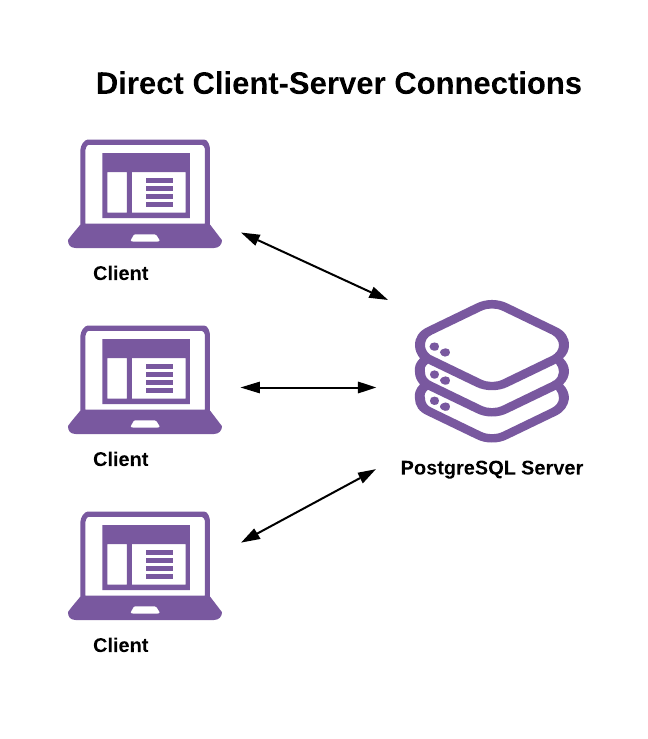
Here’s a high-level view of the PostgreSQL connection lifecycle without connection pooling:
- A client begins a new session by asking for and authenticating a connection to the server.
- The server forks a new system process to handle the connection and work session. The session’s state is initialized per a combination of server-level, database-level, and user-level configuration parameters.
- The client does as much work as it needs by executing one or more transactions. Examples include:
- Execute reads and writes against relations (tables, views, etc.)
- Use the SET command to change the session or transaction state
- Prepare and execute prepared statements
- The session ends when the client disconnects.
- The server destroys the process that handled the session.
A database session consists of all the work done over a single connection’s lifetime. Database sessions are of variable length in time and consume a variable amount of resources on both the client and server.
- The key takeaways from this are:
- Creating, managing, and destroying connection processes takes time and consumes resources.
- As a server’s connection count grows, the resources needed to manage those connections also grow. Further, a server’s per-process memory usage continues to grow as clients do work on them.
- Since a single session only services a single client, clients can change the database session’s state and expect those changes to persist across successive transactions.
What is Connection Pooler
A connection pooler sits between clients and the server. Clients connect to the pooler and the pooler connects to the server. Introducing a connection pooler changes the connection model to a client-proxy-server architecture:
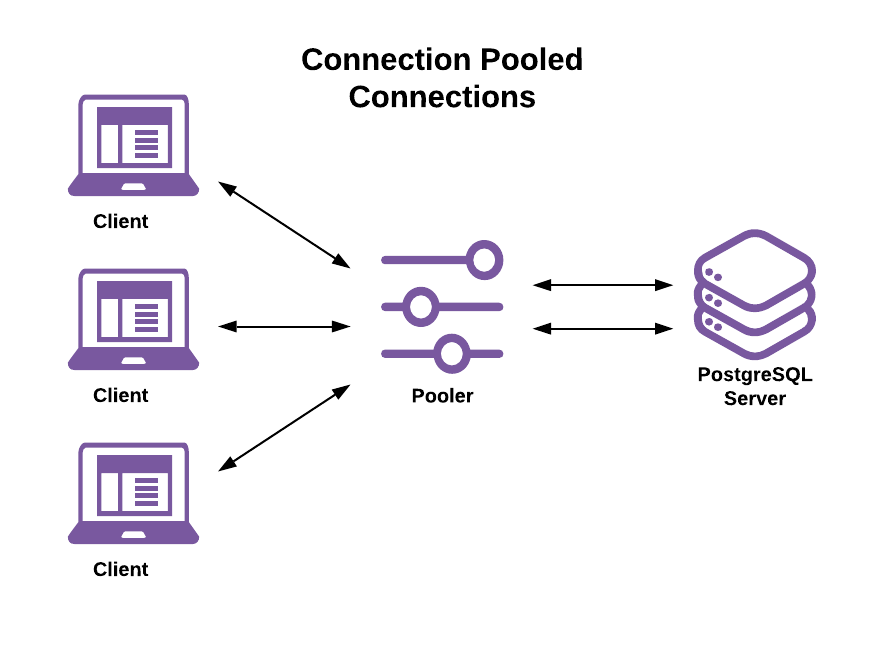
This decouples the client connection lifetime from the server connection and process lifetime.
- The connection pooler is now responsible for:
- Accepting and managing connections from the client
- Establishing and maintaining connections to the server
- Assigning server connections to client connections
- This allows:
- A single-server connection to handle sessions, transactions, and statements from different clients
- A single client session’s transactions and/or statements to run on different server connections
- In the rest of this article:
- client connection refers to a connection between a client and the connection pooler
- server connection refers to a connection between the connection pooler and server
Django and the Cost of Database Connections
Let’s measure the actual overhead:
import time
import psycopg2

# Time to establish a connection
start = time.perf_counter()
conn = psycopg2.connect(
    host='localhost',
    dbname='myapp',
    user='postgres',
    password='password',
)
elapsed = time.perf_counter() - start
print(f'Connection time: {elapsed * 1000:.2f}ms')
# Typical output: 5-50ms locally, 50-200ms over network
On a server handling 1000 requests/second, that’s 5–50 seconds of CPU time spent just connecting. Per second.
PostgreSQL Connection Limits
PostgreSQL has a maximum connection limit (default: 100). Each connection consumes memory (~10MB). With multiple Django workers, you hit limits fast:
 4 web servers × 8 Gunicorn workers × 1 connection = 32 connections
 + 4 Celery workers × 1 connection = 36 connections
 + Django shell, migrations, cron jobs = 40+ connections
Add connection churn, and you’re constantly at the limit, with new requests waiting for connections.
Django 5.1’s Native Connection Pooling
Django 5.1 (and newer versions) added built-in connection pooling for PostgreSQL using psycopg3’s connection pool.
Prerequisites
pip install "psycopg[binary,pool]"
Note: This requires psycopg3 (the psycopg package), not psycopg2.
Basic Configuration
# config/settings/production.py
DATABASES = {
    'default': {
        'ENGINE': 'django.db.backends.postgresql',
        'NAME': config('DB_NAME'),
        'USER': config('DB_USER'),
        'PASSWORD': config('DB_PASSWORD'),
        'HOST': config('DB_HOST'),
        'PORT': config('DB_PORT', default='5432'),
        'OPTIONS': {
            'pool': True,  # Enable connection pooling
        },
    }
}
That’s it. Django now maintains a connection pool per process.
Advanced Configuration
# config/settings/production.py
DATABASES = {
    'default': {
        'ENGINE': 'django.db.backends.postgresql',
        'NAME': config('DB_NAME'),
        'USER': config('DB_USER'),
        'PASSWORD': config('DB_PASSWORD'),
        'HOST': config('DB_HOST'),
        'PORT': config('DB_PORT', default='5432'),
        'OPTIONS': {
            'pool': {
                'min_size': 2,      # Minimum connections to keep open
                'max_size': 10,     # Maximum connections per process
                'timeout': 10,      # Seconds to wait for available connection
                'max_idle': 300,    # Close idle connections after 5 minutes
                'max_lifetime': 3600,  # Recycle connections after 1 hour
                'reconnect_timeout': 5,  # Retry connection for 5 seconds
            },
        },
    }
}
Pool Size Calculation
Calculate your pool size based on your deployment:
# Per-process pool
# Each Gunicorn worker is a separate process with its own pool

# Example: 4 Gunicorn workers with max_size=10
# Maximum database connections: 4 × 10 = 40 connections

# Rule of thumb:
# max_size = (PostgreSQL max_connections - buffer) / total_processes
#
# If max_connections = 100, buffer = 20, processes = 8
# max_size = (100 - 20) / 8 = 10
When Native Pooling Works Best
- Django’s native pooling is ideal when:
- You have a moderate number of application processes
- All connections are from Django (not shared with other services)
- You’re using psycopg3
- You don’t need transaction-level pooling
CONN_MAX_AGE: The Legacy Approach
Before Django 5.1, the main pooling mechanism was CONN_MAX_AGE:
DATABASES = {
    'default': {
        'ENGINE': 'django.db.backends.postgresql',
        # ... connection details
        'CONN_MAX_AGE': 60,  # Keep connections open for 60 seconds
    }
}
- How CONN_MAX_AGE Works
- None (default): Close connection after each request
- 0: Same as None
- > 0: Reuse connection for this many seconds
- None with persistent connections: Keep forever (use with caution)
CONN_MAX_AGE vs Native Pooling:
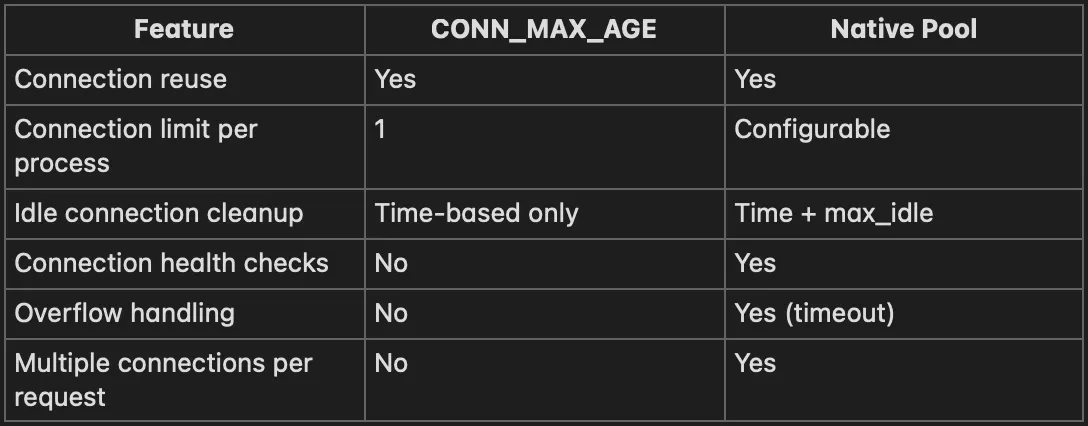
Recommendation: Use native pooling in Django 5.1+. Use CONN_MAX_AGE only if you can’t upgrade.
PgBouncer: External Connection Pooling
For high-scale deployments, PgBouncer provides connection pooling at the infrastructure level:
[Django Workers] → [PgBouncer] → [PostgreSQL]
     Many              Few            One
   connections      connections     database
- Why PgBouncer?
- Centralized pooling: One pool shared across all application servers
- More efficient: Fewer total connections to PostgreSQL
- Language agnostic: Works with any PostgreSQL client
- Transaction pooling: Connections returned between transactions (not just requests)
- Battle-tested: Used by massive deployments
Installing PgBouncer
# Ubuntu/Debian
sudo apt install pgbouncer

# macOS
brew install pgbouncer
PgBouncer Basic Configuration
; /etc/pgbouncer/pgbouncer.ini

[databases]
; Map logical database names to actual databases
myapp = host=localhost port=5432 dbname=myapp_production

[pgbouncer]
; Connection settings
listen_addr = 127.0.0.1
listen_port = 6432
auth_type = md5
auth_file = /etc/pgbouncer/userlist.txt

; Pool settings
pool_mode = transaction          ; Key setting - see below
max_client_conn = 1000           ; Max connections from clients
default_pool_size = 20           ; Connections to PostgreSQL per database
min_pool_size = 5                ; Minimum connections to keep open
reserve_pool_size = 5            ; Extra connections for burst traffic
reserve_pool_timeout = 3         ; Seconds before using reserve pool

; Timeouts
server_idle_timeout = 600        ; Close idle server connections
client_idle_timeout = 0          ; 0 = no timeout for client connections
server_connect_timeout = 15      ; Timeout for connecting to PostgreSQL
server_login_retry = 15          ; Retry interval on connection failure

; Logging
log_connections = 1
log_disconnections = 1
log_pooler_errors = 1
stats_period = 60

; Admin console
admin_users = pgbouncer_admin
PgBouncer User Authentication
; /etc/pgbouncer/userlist.txt
"myapp_user" "md5password_hash"
"pgbouncer_admin" "admin_password_hash"
Generate password hash:
# Generate MD5 hash
echo -n "passwordusername" | md5sum
# Prefix with "md5": md5<hash>
Or use plain text (less secure):
"myapp_user" "plain_password"
PgBouncer Pool Modes Explained
PgBouncer has three pooling modes available: transaction pooling, session pooling, and statement pooling. It’s important that you understand how each work. The pooling mode used:
- Determines how long a server connection stays assigned to a client connection.
- Imposes limitations on what a client can and can’t do, as described in the next sections.
Transaction Pooling (pool_mode = transaction) - recommended
- Connection assigned at transaction start
- Released at transaction end (COMMIT/ROLLBACK)
- Very efficient for web applications
- Use when: Short transactions, no session state
Database clients rarely execute consecutive transactions with no pauses between. Instead, non-database work is performed between transactions. This means that server connections spend a lot of time idle while waiting for new work to arrive.
A server connection is assigned to a client only during a transaction. When PgBouncer notices that the transaction is over, the server will be put back into the pool. This mode breaks a few session-based features of PostgreSQL. You can use it only when the application cooperates by not using features that break. See the table below for incompatible features.
Transaction pooling mode seeks to reduce server connection idle time like so:
- The pooler assigns a server connection to a client when it begins a transaction.
- The pooler releases the connection assignment as soon as the client’s transaction completes.
This means that:
- If a client runs more than one transaction, each can be executed on different server connections.
- A single-server connection can run transactions issued by different clients over its lifetime.
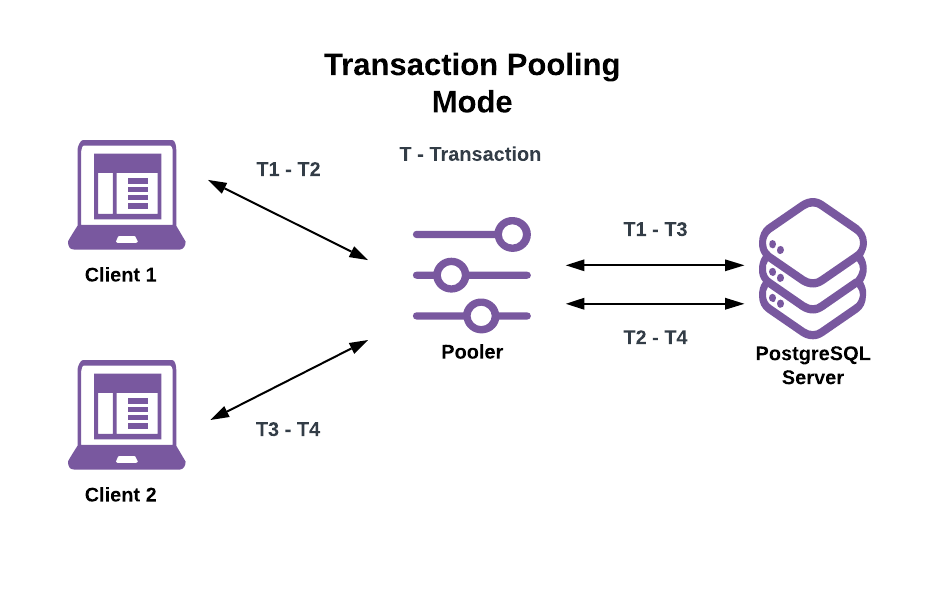
This allows for a far larger number of active clients than connections allowed by the server. While it is dependent on the given workload, it isn’t uncommon to see a 10x or more active client-connection to server-connection ratio.
This does come with an important caveat: Clients can no longer expect that changes made to database session state persist across successive transactions made by the same client, as those can run on different server connections. Furthermore, if a client makes session state changes they may, and likely will, affect other clients.
Here are some examples using the earlier transaction pooling example image:
- If Client 1 sets the session to read-only on the first server connection in T1 and Client 2’s T3 is a write transaction, then T3 fails since it runs on the now read-only server connection.
- If Client 1 runs PREPARE a1 AS ... in T1 and then runs EXECUTE a1 ... in T2, then T2 fails because the prepared statement is local to the server connection T1 was run on.
- If Client 2 creates a temporary table in T3 and attempts to use it in T4, then T4 fails because the temporary table is local to the server connection T3 was run on.
- ✅ Transaction pooling mode benefits:
- Allow for more active clients than connections allowed by the server.
- Reduce server resources needed for a given number of clients.
Session Pooling (pool_mode = session)
- Connection assigned when client connects
- Released when client disconnects
- Safest but least efficient
- Use when: You have long-lived connections
Here server connection assignments to clients last for the lifetime of the client connections. This seems the same as not using a connection pooler at all but there’s an important difference: server connections aren’t destroyed when an assigned client disconnects. When a client disconnects the pooler will:
- Clear any session state changes made by the client.
- Return the server connection to the pool for use by another client.
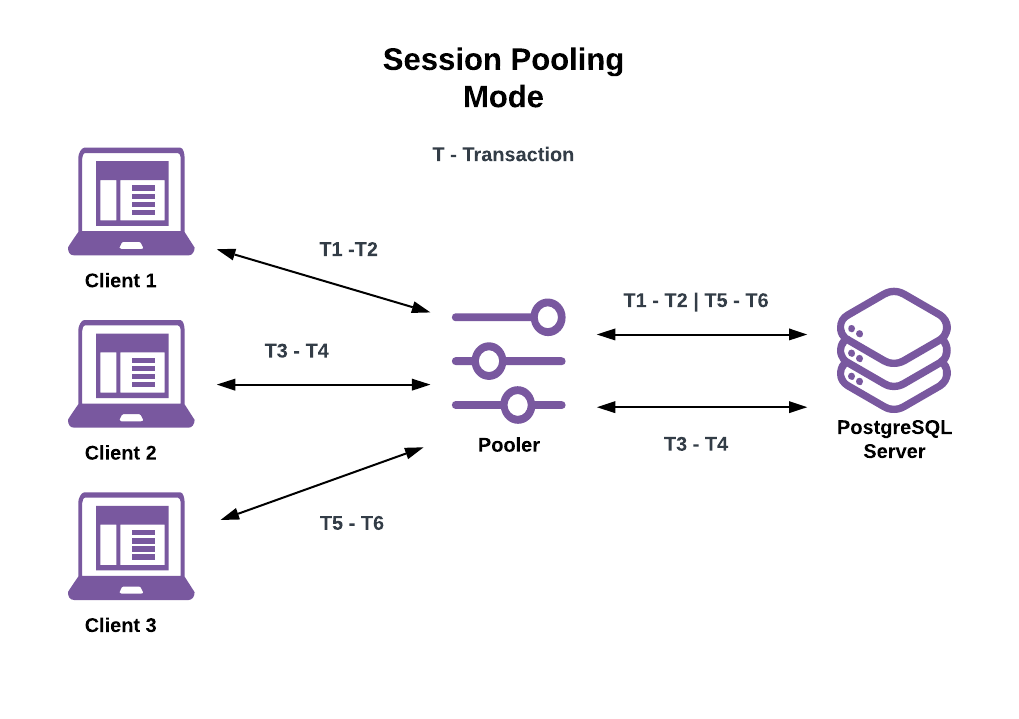
- ✅ Session pooling mode benefits:
- Session pooling reduces time spent waiting for server to create new connection processes when clients connect.
- Many ORMs and application frameworks provide session pooling via their built-in connection pools (for example, Ruby on Rails).
- 🔔 Session pooling mode caveats:
- Because server connection assignments last for the lifetime of the assigned client connection, the number of active client connections is still limited by the server’s connection limit.
- Before using PgBouncer for session pooling be sure to check your chosen application framework and/or ORM to see if it has a session pool.
Statement Pooling (pool_mode = statement)
- Connection assigned per statement
- Most aggressive pooling
- Breaks multi-statement transactions
- Use when: Only single-statement queries
Most aggressive method. This is transaction pooling with a twist: Multi-statement transactions are disallowed. This is meant to enforce “autocommit” mode on the client, mostly targeted at PL/Proxy.
Here server connections assignments last only for the duration of a single statement. This has the same session-state limitations as transaction pooling mode while also breaking transaction semantics.
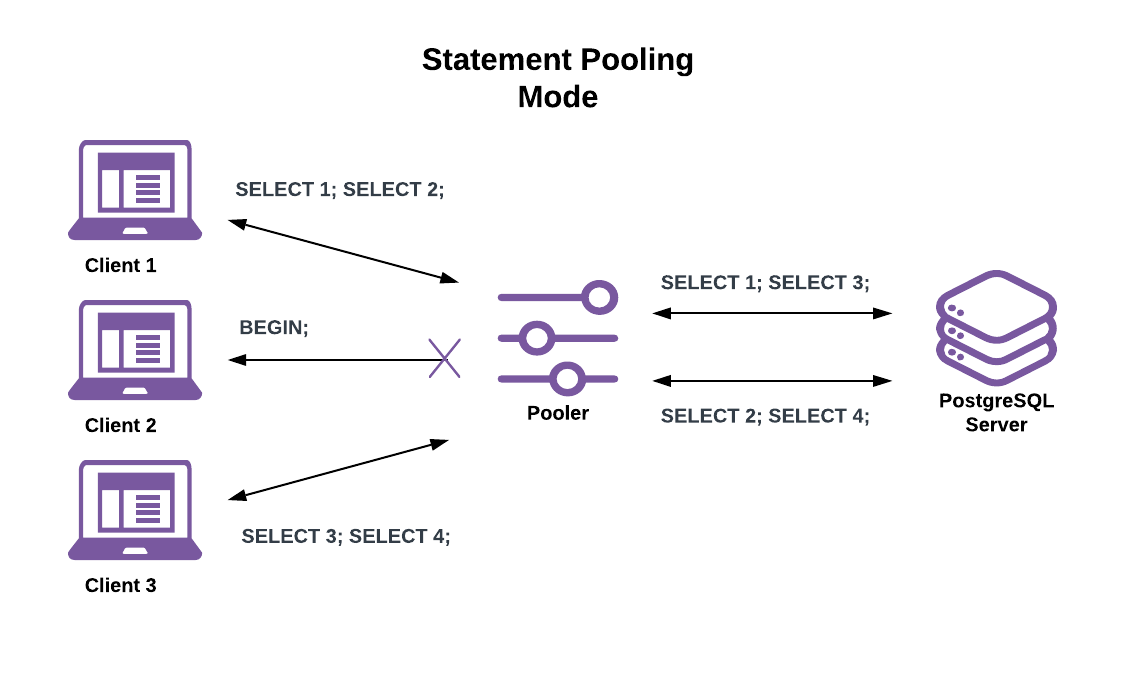
This makes all client connections behave as if in “autocommit” mode. If a client attempts to begin a multi-statement transaction the pooler returns an error. While that is limiting, it allows for even higher active client connection counts than with transaction pooling. Good use cases include serving a large volume of simple key lookups or issuing single-statement writes.
- ✅ Statement pooling mode benefits:
- Allows for far higher active client connections than even transaction pooling mode.
- 🔔 Statement pooling mode caveats:
- Has the same session state restrictions as transaction mode pooling.
- Doesn’t allow multi-statement transactions
Django Configuration for PgBouncer
# config/settings/production.py
DATABASES = {
    'default': {
        'ENGINE': 'django.db.backends.postgresql',
        'NAME': 'myapp',  # Matches [databases] section
        'USER': config('DB_USER'),
        'PASSWORD': config('DB_PASSWORD'),
        'HOST': '127.0.0.1',  # PgBouncer host
        'PORT': '6432',       # PgBouncer port (not 5432!)
        'CONN_MAX_AGE': 0,    # Let PgBouncer handle pooling
        'OPTIONS': {
            # Disable Django's native pooling when using PgBouncer
            'pool': False,
        },
        'DISABLE_SERVER_SIDE_CURSORS': True,  # Required for transaction pooling
    }
}
Important: Disable Server-Side Cursors
💡 Transaction pooling breaks server-side cursors. You must disable them:
# In settings
'DISABLE_SERVER_SIDE_CURSORS': True

# Or when using iterator()
Model.objects.iterator(chunk_size=2000)
# Won't use server-side cursor with this setting
Features That Don’t Work with Transaction Pooling
Some PostgreSQL features require session state and break with transaction pooling:
# PREPARED STATEMENTS - may cause issues
# PgBouncer can handle with server_reset_query

# ADVISORY LOCKS - won't work across transactions
from django.db import connection
with connection.cursor() as cursor:
    cursor.execute("SELECT pg_advisory_lock(1)")  # Broken!

# LISTEN/NOTIFY - requires persistent connection
# Use session pooling or direct connection

# TEMPORARY TABLES - session-scoped
# Create and use within single transaction

# SET commands - session-scoped
# Use server_reset_query to clear
Monitoring PgBouncer
Connect to admin console:
psql -p 6432 -U pgbouncer_admin pgbouncer
-- Show pools
SHOW POOLS;

-- Show stats
SHOW STATS;

-- Show servers (actual PostgreSQL connections)
SHOW SERVERS;

-- Show clients (connections from Django)
SHOW CLIENTS;

-- Show configuration
SHOW CONFIG;
Choosing Between Native Pooling and PgBouncer
- Use Django Native Pooling When:
- Single application server or few servers
- All database access is through Django
- You want simpler infrastructure
- You’re using psycopg3
- Moderate traffic (< 1000 req/s)
- Use PgBouncer When:
- Multiple application servers
- Multiple applications sharing PostgreSQL
- Very high connection count
- You need transaction-level pooling
- Legacy applications using psycopg2
- Serverless deployments (AWS Lambda)
Hybrid Approach
You can use both for defense in depth:
# Django with small native pool → PgBouncer → PostgreSQL
DATABASES = {
    'default': {
        'ENGINE': 'django.db.backends.postgresql',
        'HOST': 'pgbouncer.internal',
        'PORT': '6432',
        'OPTIONS': {
            'pool': {
                'min_size': 1,
                'max_size': 4,  # Small pool per process
            },
        },
    }
}
This reduces connection churn to PgBouncer while PgBouncer manages the PostgreSQL connection limit.
Connection Pool Monitoring
Django Debug Toolbar
Shows connection time and reuse in development:
# config/settings/development.py
INSTALLED_APPS += ['debug_toolbar']
# Connection info appears in SQL panel
Further reading: Django Debug Toolbar
Custom Monitoring
# apps/core/middleware.py
import time
from django.db import connection


class ConnectionMonitoringMiddleware:
    def __init__(self, get_response):
        self.get_response = get_response

    def __call__(self, request):
        # Track connection state before request
        was_connected = connection.connection is not None

        start = time.perf_counter()
        response = self.get_response(request)
        elapsed = time.perf_counter() - start

        # Track connection state after request
        is_connected = connection.connection is not None

        # Log connection events
        if not was_connected and is_connected:
            # New connection was established
            logger.info(f'New DB connection for {request.path}')

        return response
Further reading: Django Middleware Comprehensive Guide
PostgreSQL Connection Monitoring
-- Current connections
SELECT count(*) FROM pg_stat_activity;

-- Connections by state
SELECT state, count(*)
FROM pg_stat_activity
GROUP BY state;

-- Connections by application
SELECT application_name, count(*)
FROM pg_stat_activity
GROUP BY application_name;

-- Long-running connections
SELECT pid, now() - pg_stat_activity.query_start AS duration, query, state
FROM pg_stat_activity
WHERE (now() - pg_stat_activity.query_start) > interval '5 minutes';
Troubleshooting Connection Issues
Too Many Connections
FATAL: too many connections for role "myapp_user"
- Solutions:
- Reduce pool size per process
- Reduce number of worker processes
- Increase PostgreSQL max_connections
- Add PgBouncer
Connection Timeout
OperationalError: could not connect to server: Connection timed out
- Solutions:
- Check network connectivity
- Verify PostgreSQL is running
- Check firewall rules
- Increase connection timeout
Server Closed Connection Unexpectedly
OperationalError: server closed the connection unexpectedly
- Causes:
- PostgreSQL restarted
- Network interruption
- Connection killed by PgBouncer timeout
Solutions:
# Enable connection health checks
DATABASES = {
    'default': {
        # ...
        'OPTIONS': {
            'pool': {
                'max_lifetime': 1800,  # Recycle connections
            },
        },
    }
}
Stale Connections After PostgreSQL Restart
# Force close all connections
from django.db import connections

for conn in connections.all():
    conn.close()
Or use a management command:
# apps/core/management/commands/reset_db_connections.py
from django.core.management.base import BaseCommand
from django.db import connections


class Command(BaseCommand):
    help = 'Reset all database connections'

    def handle(self, *args, **options):
        for conn in connections.all():
            conn.close()
        self.stdout.write(self.style.SUCCESS('Connections reset'))
Production Checklist
PostgreSQL Settings
-- Recommended settings for connection pooling
ALTER SYSTEM SET max_connections = 200;
ALTER SYSTEM SET shared_buffers = '256MB';
ALTER SYSTEM SET work_mem = '16MB';

-- Reload configuration
SELECT pg_reload_conf();
Django Settings
# config/settings/production.py
DATABASES = {
    'default': {
        'ENGINE': 'django.db.backends.postgresql',
        'NAME': config('DB_NAME'),
        'USER': config('DB_USER'),
        'PASSWORD': config('DB_PASSWORD'),
        'HOST': config('DB_HOST'),
        'PORT': config('DB_PORT'),
        'OPTIONS': {
            'pool': {
                'min_size': 2,
                'max_size': 10,
                'timeout': 30,
                'max_idle': 300,
                'max_lifetime': 3600,
            },
            'connect_timeout': 10,
        },
    }
}

# Connection health
CONN_HEALTH_CHECKS = True  # Django 4.1+
Monitoring Alerts
- Set up alerts for:
- Connection count > 80% of max
- Connection wait time > 1 second
- Failed connection attempts
- Long-running queries
Key Takeaways
- Connection overhead is real — 5–50ms per connection adds up at scale.
- Django 5.1 native pooling is usually enough — Simple configuration, good performance.
- Use PgBouncer for high scale — Centralized pooling across multiple servers.
- Transaction pooling has limitations — No prepared statements, advisory locks, or temp tables across transactions.
- Calculate pool sizes carefully — Total connections across all processes must be under PostgreSQL limit.
- Monitor connection usage — Watch for connection exhaustion before it becomes a crisis.
- Plan for PostgreSQL restarts — Connections will die; your app should recover gracefully.