Python Libraries That Shocked Me With Their Power

rich (Beautiful Console Apps With No Design Degree Required)
If your CLI output looks like a Windows 98 error screen, this is your fix.
>>> from rich.console import Console
>>> from rich.table import Table
>>>
>>> console = Console()
>>> table = Table(title="Crypto Prices")
>>>
>>> table.add_column("Coin", style="cyan")
>>> table.add_column("Price", justify="right", style="green")
>>>
>>> table.add_row("Bitcoin", "$43,210")
>>> table.add_row("Ethereum", "$3,210")
>>>
>>> console.print(table)
    Crypto Prices
┌──────────┬─────────┐
│ Coin     │   Price │
├──────────┼─────────┤
│ Bitcoin  │ $43,210 │
│ Ethereum │  $3,210 │
└──────────┴─────────┘
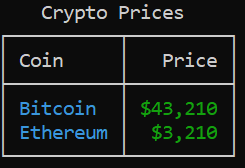 python rich tables example
boltons (Batteries You Didn’t Know Were Missing)
Think of boltons as the "secret drawer" of Python utilities.
- boltons.iterutils.unique_iter(src, key=None)
- unique docs
- Yield unique elements from the iterable, src, based on key, in the order in which they first appeared in src.
- By default, key is the object itself, but key can either be a callable or, for convenience, a string name of the attribute on which to uniqueify objects, falling back on identity when the attribute is not present.
import boltons

boltons.iterutils.unique([1,2,3,4,5,6,1,2])
# [1, 2, 3, 4, 5, 6]

list(boltons.iterutils.unique_iter(['hi', 'hello', 'ok', 'bye', 'yes'], key=lambda x: len(x)))
# ['hi', 'hello', 'bye']

1 > 2
# False
2 > 2
# False
# 3 > 2
True

boltons.iterutils.unique([1,2,3,4,5,6], key=lambda x : x > 2)
# [1, 3]
- boltons.iterutils.redundant(src, key=None, groups=False)
- The complement of unique()
- redundant docs
- By default returns non-unique/duplicate values as a list of the first redundant value in src. Pass groups=True to get groups of all values with redundancies, ordered by position of the first redundant value. This is useful in conjunction with some normalizing key function.
from boltons.iterutils import redundant

redundant([1, 2, 3, 4])
# []
redundant([1, 2, 3, 2, 3, 3, 4])
# [2, 3]
redundant([1, 2, 3, 2, 3, 3, 4], groups=True)
# [[2, 2], [3, 3, 3]]


# An example using a key function to do case-insensitive redundancy detection.

redundant(['hi', 'Hi', 'HI', 'hello'], key=str.lower)
# ['Hi']

redundant(['hi', 'Hi', 'HI', 'hello'], groups=True, key=str.lower)
# [['hi', 'Hi', 'HI']]
tenacity — Retry Logic Without Losing Your Sanity
Retry logic is one of those things everyone underestimates — until production humbles them. tenacity gives you declarative retries with backoff, limits, and conditions.
from tenacity import retry, stop_after_attempt, wait_exponential

@retry(stop=stop_after_attempt(3), wait=wait_exponential(multiplier=1))
def flaky_call():
    print("Trying...")
    raise Exception("Network hiccup")

flaky_call()
Why pros love it:** Retries are not business logic. They’re infrastructure concerns. tenacity keeps them out of your core code and makes failures predictable instead of chaotic.
watchdog — React to File Changes Like a Pro
Polling files is inefficient. watchdog lets you react to filesystem events in real time.
from watchdog.observers import Observer
from watchdog.events import FileSystemEventHandler
import time

class Handler(FileSystemEventHandler):
    def on_modified(self, event):
        print(f"Modified: {event.src_path}")

observer = Observer()
observer.schedule(Handler(), path=".", recursive=False)
observer.start()

try:
    while True:
        time.sleep(1)
except KeyboardInterrupt:
    observer.stop()

observer.join()
- Use cases you didn’t know you needed:
- Auto-reload configs
- Trigger builds
- Sync files
- Watch ML datasets update
Fact: This is how you stop writing while True: sleep(5) like a caveman.
pywhat (What Even Is This File?)
Ever get a weird file, string, or hex blob and wonder what on earth it is?
from pywhat import whatis

print(whatis("d41d8cd98f00b204e9800998ecf8427e"))
# Output: MD5 hash of an empty string
- It identifies file types, encodings, and hashes like a forensic detective.
- This library can detect 300+ patterns, from obscure hash algorithms to credit card numbers.
- pywhat docs
Playwright — Automating the Web
Problem: Logging into portals and downloading files manually. Every. Single. Day. \
Project: Auto-login bot.
- Steps
- Use Playwright to launch Chromium in headless mode.
- Log into your account.
- Download the latest statement automatically.
# pip install playwright
# pip install pytest-playwright (optional)

# Install the required browsers:
# playwright install

from playwright.sync_api import sync_playwright
import re

with sync_playwright() as p:
    browser = p.firefox.launch(headless=False, slow_mo=5000)
    page = browser.new_page()
    page.goto("https://playwright.dev")
    print(page.title())
    browser.close()
Can you take a screenshot from webpage?
from playwright.sync_api import sync_playwright
with sync_playwright() as p:
    browser = p.chromium.launch()
    page = browser.new_page()
    page.goto("https://example.com")
    page.screenshot(path="site.png")
The best part? It doesn’t break every time the site sneezes (looking at you, Selenium 👀).
PyAutoGUI: Automate Your Computer Like a Hacker
Ever wanted your script to literally move your mouse, type into apps, or take screenshots? That’s PyAutoGUI.
import pyautogui

pyautogui.moveTo(500, 500)
pyautogui.click()
pyautogui.typewrite("Automation is fun!")
Pydantic-Core (v2) – Data Validation Without the Bloat
Forget what you knew about Pydantic v1. Pydantic-Core (which powers Pydantic v2) is a Rust-backed, zero-dependency, high-speed data validation and serialization engine. And you can use it completely standalone — no FastAPI needed.
- Why it’s modular:
- You define schema validation without touching any HTTP logic.
- Works as a thin validation layer — plug it into any project.
- Interop with JSON Schema, msgpack, or even direct memory structures.
from pydantic_core import SchemaValidator

schema = {
    'type': 'typed-dict',
    'fields': {
        'name': {'schema': {'type': 'str'}},
        'age': {'schema': {'type': 'int'}}
    }
}

validator = SchemaValidator(schema)
data = validator.validate_python({'name': 'Alice', 'age': 30})
Why it changed how I work:
I stopped trusting incoming JSON structures from external sources. Now I run everything through Pydantic-Core — it’s like a seatbelt for your data.
Pydantic-Core is 70x faster than the original Pydantic in many cases. Yes, seventy.
orjson — Because JSON Is on Your Hot Path
If your app touches JSON a lot (APIs, queues, configs), speed matters more than you think.
orjson is absurdly fast and fully RFC-compliant.
import orjson

data = {"user": "alice", "roles": ["admin", "editor"]}
json_bytes = orjson.dumps(data)
parsed = orjson.loads(json_bytes)

print(parsed)
Real-world impact: In high-throughput services, switching from json* to orjson* can shave milliseconds per request. Multiply that by millions. Now it’s money.
Msgspec – JSON Parsing at C-Speed with Type Safety
Frameworks love their JSON. But they parse it slow. Enter msgspec, a lesser-known gem that delivers ultra-fast JSON, MessagePack, and TOML parsing with optional type checking.
Think Pydantic + orjson — but leaner, faster, and with zero dependencies.
import msgspec

class User(msgspec.Struct):
    name: str
    age: int

data = msgspec.json.decode(b'{"name": "Alice", "age": 30}', type=User)
- Why it’s modular:
- Plug it into any project — no need for ORM, framework, or API layer.
- Works with plain structs — no magic metaclasses.
- Serialization + deserialization in one.
On large payloads, msgspec is 10–15x faster than the standard json module. I use msgspec as the default deserializer for every API service I build. It’s like giving your app a JSON Red Bull.
Polars — Pandas, But on Steroids
I love Pandas, but it’s slow. Real slow. When I switched to Polars, my scripts that used to take minutes ran in seconds.
import polars as pl
df = pl.read_csv("data.csv")
print(df.filter(pl.col("age") > 30))
It’s lazy-evaluated, multithreaded, and it feels like using NumPy with superpowers.
Pro tip: Don’t rewrite your whole pipeline, just swap in Polars where Pandas bottlenecks.
APScheduler — Time-Box Your Python
I once wrote a cron job that deleted half my logs by accident. That was fun. Then I discovered APScheduler. It lets me schedule jobs like:
from apscheduler.schedulers.background import BackgroundScheduler
def job():
    print("Running job...")
scheduler = BackgroundScheduler()
scheduler.add_job(job, "interval", seconds=10)
scheduler.start()
No Linux magic, no broken crontabs. Just Python managing Python.
Perfect for automation pipelines that run on your laptop or a server.
PyAutoGUI — Because Sometimes You Have to Click
I once automated my college portal login because their captcha was… let’s just say “optional.”
import pyautogui
pyautogui.moveTo(100, 200)
pyautogui.click()
Mouse moves, clicks, and keystrokes all in Python.
Sure, it feels hacky. But when you need to automate repetitive clicks, nothing beats it.
Prefect — Workflow Automation Without the Headache
Airflow is great if you have a DevOps team.
For the rest of us? Prefect.
from prefect import flow, task
@task
def add(x, y):
    return x + y
@flow
def my_flow():
    print(add(1, 2))
my_flow()
Workflows, retries, dashboards minus the 10,000-line YAML configs.
I use it for data pipelines, ETL jobs, and even coordinating multi-step ML experiments.
Python Security Libraries
Below are Python libraries that make security practical, boring, and safe — the way good security should be. These are tools I’ve personally used after four years of building real systems, not toy examples. Some are popular. Some are criminally underused.
Let’s go.
cryptography — Real Encryption, No Guesswork
If you’re still rolling your own encryption logic… stop. Immediately.
cryptography is the gold standard Python library for symmetric encryption, asymmetric encryption, hashing, and key derivation. It’s backed by experts who actually understand math (rare breed).
Example: Encrypt & decrypt safely with Fernet
from cryptography.fernet import Fernet

key = Fernet.generate_key()
cipher = Fernet(key)

secret_data = b"My API token"
encrypted = cipher.encrypt(secret_data)
decrypted = cipher.decrypt(encrypted)

print(decrypted.decode())
Why it matters: Fernet enforces best practices by default: AES encryption, HMAC authentication, and time-safe comparisons. You literally can’t mess it up unless you try.
passlib — Password Hashing Done Right
If you ever see hashlib.md5(password) in a codebase, that’s a cry for help.
passlib handles password hashing, salting, and verification using battle-tested algorithms like bcrypt and argon2.
Example: Hashing passwords properly
from passlib.context import CryptContext

pwd_context = CryptContext(schemes=["bcrypt"], deprecated="auto")
hashed = pwd_context.hash("super_secret_password")

print(pwd_context.verify("super_secret_password", hashed))
Pro insight: You should never know how passwords are stored. passlib ensures even you can’t reverse them.
secrets — Stop Using random for Security
This library exists because too many developers used random for security-sensitive things.
secrets is built specifically for cryptographic randomness.
Example: Secure token generation
import secrets

token = secrets.token_urlsafe(32)
print(token)
- Use cases:
- Password reset links
- API tokens
- Session IDs
argon2-cffi — Password Hashing for the Paranoid (Good)
Argon2 won the Password Hashing Competition. That’s not marketing — that’s math. If you want state-of-the-art password security, use this.
Example: Argon2 hashing
from argon2 import PasswordHasher

ph = PasswordHasher()
hash = ph.hash("correct horse battery staple")

ph.verify(hash, "correct horse battery staple")
Why experts love it: Argon2 is memory-hard. That makes GPU and ASIC attacks expensive. Attackers hate expensive.
itsdangerous — Secure Tokens Without a Database
Ever needed to generate a signed token that expires — but didn’t want to store it? That’s itsdangerous.
Example: Time-limited signed tokens
from itsdangerous import URLSafeTimedSerializer

serializer = URLSafeTimedSerializer("SECRET_KEY")

token = serializer.dumps("user_id=42")
data = serializer.loads(token, max_age=3600)

print(data)
- Perfect for:
- Email verification links
- Password reset tokens
- Stateless authentication flows
Flask uses this internally. That should tell you something.
pyjwt — JWTs Without Tears
JWTs are easy to misuse. pyjwt keeps them sane.
Example: Creating and verifying JWTs
import jwt
from datetime import datetime, timedelta

payload = {
    "user_id": 42,
    "exp": datetime.utcnow() + timedelta(minutes=15)
}

token = jwt.encode(payload, "SECRET", algorithm="HS256")
decoded = jwt.decode(token, "SECRET", algorithms=["HS256"])
bandit — Static Security Analysis for Python
This one is rare — and powerful. bandit scans your codebase for security vulnerabilities before attackers do.
Example: Run Bandit on a project
~] bandit -r your_project/
- What it catches:
- Hardcoded passwords
- Insecure subprocess usage
- Weak cryptography
- Dangerous eval patterns
python-dotenv — The Simplest Security Win
Not glamorous. Extremely effective. Move secrets out of code. Period.
from dotenv import load_dotenv
import os

load_dotenv()
print(os.getenv("DATABASE_PASSWORD"))
Fact: Most credential leaks come from GitHub commits — not hackers. This library fixes that in five minutes.