Python SocketServer Guide

The socketserver module (formerly capitalized as SocketServer in Python 2) is a framework in the Python standard library designed to simplify the task of writing network servers. It abstracts away much of the boilerplate code required to set up sockets, bind to addresses, listen for incoming connections, and handle requests.
At its core, socketserver decouples the server-level transport mechanism (how connections are accepted and managed) from the application-level logic (how individual requests are processed).
This article explores the inner workings of the socketserver module, with a deep dive into its class hierarchy, Request Handler Objects, and the concurrent processing models enabled by ForkingMixIn and ThreadingMixIn.
1. Module Architecture and Class Hierarchy
The core design principle of socketserver is the separation of concerns:
- The Server Class: Responsible for transport-level concerns—binding the socket, listening for connections, accepting requests, and managing the main execution loop.
- The Request Handler Class: Responsible for protocol-level concerns—reading data from the client, parsing the request, executing business logic, and sending back a response.
- Mixin Classess - helpers to handle multiple concurrent connections
Server Classes
BaseServer: The abstract base class defining the API for all server objects. It implements the event loop (serve_forever()) and request dispatching, but does not implement protocol-specific transport logic.TCPServer: Uses the Internet TCP protocol to provide continuous streams of data.UDPServer: Uses the Internet UDP protocol to handle discrete packets of information.UnixStreamServer/UnixDatagramServer: Similar to TCP/UDP servers, but use Unix domain sockets (only available on Unix-like systems).
Request Handler Classes
BaseRequestHandler: The foundational class for processing incoming client requests.StreamRequestHandler: A subclass optimized for stream-oriented (TCP) sockets, wrapping the connection in file-like interfaces (rfileandwfile).DatagramRequestHandler: A subclass optimized for packet-oriented (UDP) sockets.
The MixIn Classes
To handle multiple concurrent connections, the module provides two "MixIn" classes designed to override the default synchronous behavior of BaseServer:
ThreadingMixIn: Spawns a new OS-level thread for every incoming connection.ForkingMixIn: Spawns a new child process for every incoming connection (usingos.fork(), limited to Unix-like platforms).
Architecture Diagram
The relationship between these components can be visualized as follows:
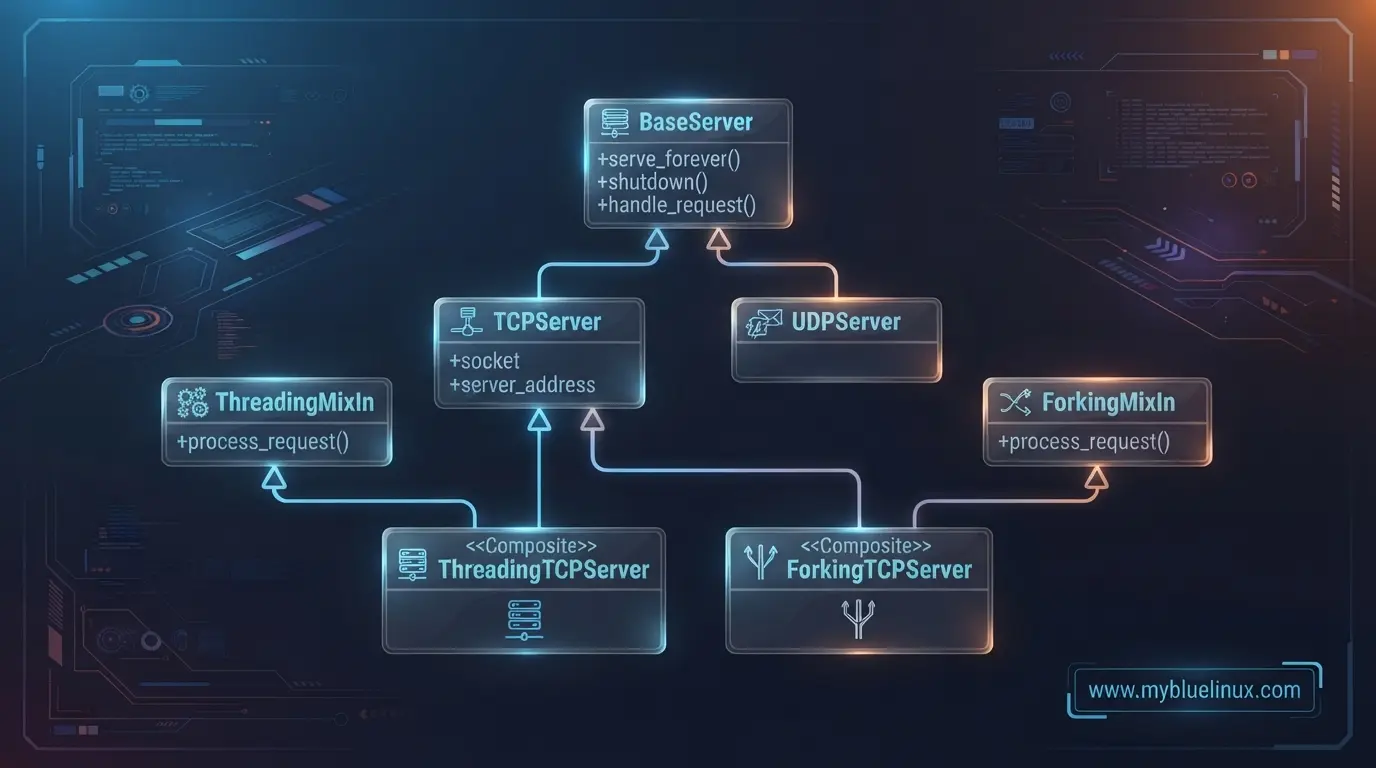
ThreadingTCPServer, Python’s Method Resolution Order (MRO) requires the MixIn class to be inherited first (e.g., class ThreadingTCPServer(ThreadingMixIn, TCPServer)). This ensures the MixIn’s overridden process_request method is resolved before TCPServer's default implementation.
2. Request Handler Objects
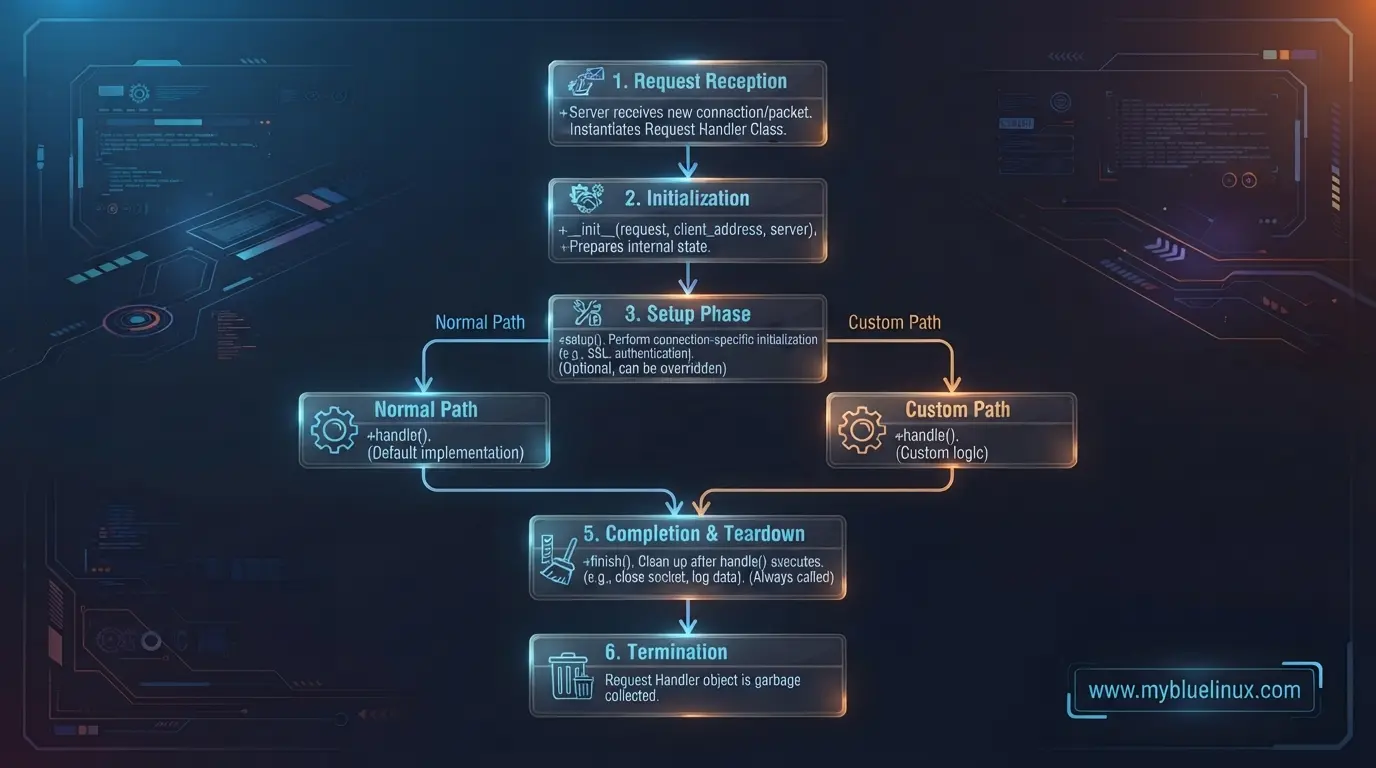
When a server accepts an incoming request (a network connection), it instantiates a Request Handler class to process that specific request. A separate instance of the handler class is created for each connection.
The Request Lifecycle
The lifetime of a Request Handler object is governed by three methods, called sequentially during instantiation:
[ Client Connection ]
         │
         ▼
[ Instantiate RequestHandler ]
         │
         ▼
 1. setup()     ──► Initializes buffers/streams
         │
         ▼
 2. handle()    ──► Implements application-specific logic
         │
         ▼
 3. finish()    ──► Cleans up/closes connection
setup(): Called beforehandle()to perform initialization actions. InStreamRequestHandlerandDatagramRequestHandler, this method initializes self-wrapping file-like buffers for reading and writing.handle(): Where the actual work is done. By default, the base class implementation does nothing. You must override this method to read client data, process it, and send responses.finish(): Called afterhandle()to clean up. It is executed even ifhandle()raises an exception.
BaseRequestHandler vs. StreamRequestHandler
The BaseRequestHandler provides raw access to the socket through self.request (which is a raw socket object for TCP, or a tuple containing data and the client socket for UDP).
For TCP connections, StreamRequestHandler is typically preferred because it abstracts the socket into two file-like objects:
self.rfile: A file-like object open for reading. You can use standard methods likereadline()orread().self.wfile: A file-like object open for writing. You can write data to the client usingwrite()and ensure transmission withflush().
Custom StreamRequestHandler Example:
import socketserver

class LineByLineHandler(socketserver.StreamRequestHandler):
    def handle(self):
        print(f"Handling connection from: {self.client_address}")

        # self.rfile and self.wfile are set up by setup()
        # rfile and wfile behaves like a standard opened file
        for line in self.rfile:
            stripped = line.decode('utf-8').strip()
            if stripped == "EXIT":    # Client disconnected after type EXIT
                break

            response = f"Acknowledged: {stripped}\n".encode('utf-8')
            self.wfile.write(response)
            self.wfile.flush() # Ensure data is sent over the wire immediately
Choosing the Right Base Class
Python provides three main request handler classes:
| Class | Transport Type | Primary Input/Output Interface | Use Case |
|---|---|---|---|
BaseRequestHandler |
Generic (TCP/UDP) | Raw connection object via self.request |
Custom socket interactions or non-standard protocols |
StreamRequestHandler |
TCP / Stream | File-like interfaces: self.rfile and self.wfile |
Text-based or line-by-line streaming protocols |
DatagramRequestHandler |
UDP / Datagram | File-like interfaces wrapping memory buffers | Unreliable datagram-based communications |
Using StreamRequestHandler simplifies socket operations. Instead of dealing with the partial reads and chunked transmissions of raw sockets, you interact with file-like objects:
self.rfile: A read-only binary stream supporting standard operations likeread(),readline(), and iteration.self.wfile: A write-only binary stream supportingwrite()andflush().
3. Concurrency with MixIns
By default, standard servers like TCPServer are synchronous. If a client connects and keeps the connection open (as is typical in HTTP/1.1 or custom persistent protocol loops), the server is blocked and cannot accept any other incoming connections until that first connection is closed.
To handle multiple concurrent clients, the socketserver module uses mixins to alter the request dispatching phase.
💡 Key Takeaway: To enable concurrency, Python uses Mix-in classes. By combining ThreadingMixIn with TCPServer, you get a ThreadingTCPServer that executes each request in a separate thread
ThreadingMixIn
When you mix ThreadingMixIn into a server class, the server overrides the default process_request method. Instead of processing the request in the main thread, it spawns a new OS thread to handle it.
               [ Main Thread (serve_forever) ]
                             │
                     Client Connection
                             │
                             ▼
                     [ process_request ]
                             │
             ┌───────────────┴───────────────┐
             ▼                               ▼
     [ Spawn New Thread ]           [ Continue Listening ]
             │
     [ Instantiate Handler ]
             │
         [ handle() ]
Key Characteristics of ThreadingMixIn:
- Memory overhead: Low to moderate. Spawning a thread takes far fewer resources than spawning a process.
- Data sharing: Threads share the same memory space. If handlers access global variables or shared resources (like database connections), you must use synchronization mechanisms (e.g.,
threading.Lock) to avoid race conditions. - GIL limitations: Because of the Python Global Interpreter Lock (GIL), CPU-heavy tasks within threads will not gain true multi-core speedup. It is highly effective for I/O-bound tasks (network waiting, file reads).
ForkingMixIn
When ForkingMixIn is used, the server calls os.fork() for each incoming connection. This clones the server process, producing a parent and a child. The child process handles the connection and exits when finished, while the parent continues to listen for new connections.
               [ Parent Process (PID: 1000) ]
                             │
                     Client Connection
                             │
                             ▼
                     [ process_request ]
                             │
                     os.fork() called
                             │
             ┌───────────────┴───────────────┐
             ▼                               ▼
[ Child Process (PID: 1001) ]    [ Parent Process (PID: 1000) ]
             │                               │
     [ Instantiate Handler ]         [ Continue Listening ]
             │
         [ handle() ]
             │
          [ exit() ]
Key Characteristics of ForkingMixIn:
- Operating System support: Available exclusively on Unix-like systems (Linux, macOS). It will raise errors on Windows due to the lack of
os.fork(). - Memory Isolation: Each child process runs in its own memory space. Changes to state in one handler do not affect other handlers or the parent process. This eliminates the need for locking mechanisms for safety.
- Process Management (Zombie Processes): The framework automatically reaps dead child processes (
collect_children()) to prevent resource leaks (zombie processes), though long-running child processes require careful tracking of state. - CPU-bound performance: Unlike threading, multi-process execution leverages multiple CPU cores, avoiding GIL limitations for CPU-heavy request processing.
Comparing the Concurrency Paradigms
| Feature | Single-threaded (Default) | ThreadingMixIn | ForkingMixIn |
|---|---|---|---|
| Concurrency Model | Synchronous (Sequential) | Multithreaded (Concurrent) | Multi-process (Parallel/Concurrent) |
| Platform Support | Windows, Unix, Mac | Windows, Unix, Mac | Unix-like systems only |
| GIL Bound | Yes | Yes (I/O execution is still asynchronous) | No (Processes bypass the GIL) |
| Memory Isolation | Shared | Shared (Risk of race conditions) | Isolated (Safe from memory sharing side-effects) |
| Resource Overhead | Extremely low | Low to Moderate | High (Creating processes is heavy) |
| Best Used For | Lightweight services with fast operations | Highly connected, I/O-heavy protocols | CPU-bound computation or secure isolated execution |
4. Cleaning Up and Shutting Down
A resilient network server must handle exits gracefully to avoid port binding errors when restarted. Setting allow_reuse_address = True in custom server classes ensures the operating system releases the local socket quickly from the TIME_WAIT state, allowing immediate re-binding.
When shutting down a server, the standard sequence is:
server.shutdown(): Instructs theserve_forever()loop to stop. This block waits until the loop completes its current cycle.server.server_close(): Closes the main server socket, cleaning up bound resources.
5. Practical Implementation Examples
Below is a complete, runnable example of a multi-threaded server using ThreadingTCPServer and StreamRequestHandler, paired with a simulated client pool to demonstrate concurrent request handling.
Threaded Server Implementation (server.py)
ThreadingTCPServer inherits first from ThreadingMixIn, TCPServer must be inherited as second.
import socketserver
import threading
import time

class ThreadedTimeHandler(socketserver.StreamRequestHandler):
    """
    Simulates a heavy-computation/I/O task per client connection.
    It reads a name from the client, sleeps for 3 seconds to simulate processing,
    and returns a formatted string.
    """
    def handle(self):
        thread_name = threading.current_thread().name
        client_address = self.client_address
        print(f"[{thread_name}] Assigned connection from {client_address}")

        try:
            # Read a line of data
            data = self.rfile.readline().decode('utf-8').strip()
            print(f"[{thread_name}] Received message: '{data}' from {client_address}")

            # Simulate high-latency processing
            time.sleep(3)

            # Formulate response
            response = f"Hello {data}! Thread: {thread_name}\n".encode('utf-8')
            self.wfile.write(response)
            self.wfile.flush()

        except Exception as e:
            print(f"[{thread_name}] Error: {e}")
        finally:
            print(f"[{thread_name}] Finished handling {client_address}")

class ConcurrentTCPServer(socketserver.ThreadingMixIn, socketserver.TCPServer):
    # Allow immediate reuse of the port after shutdown (avoids TIME_WAIT bind errors)
    allow_reuse_address = True
    # If True, the server won't block main execution thread on exit for active handlers
    daemon_threads = True

if __name__ == "__main__":
    HOST, PORT = "127.0.0.1", 9999

    server = ConcurrentTCPServer((HOST, PORT), ThreadedTimeHandler)

    print(f"Server started on {HOST}:{PORT}. Press Ctrl+C to stop.")
    try:
        server.serve_forever()
    except KeyboardInterrupt:
        print("\nShutting down server.")
        server.shutdown()
        server.server_close()
Concurrent Test Clients (client.py)
This client script spawns multiple client connections at the same time. If the server were synchronous, the clients would be processed sequentially (taking ~9 seconds total). Under ThreadingTCPServer, they execute concurrently (~3 seconds total).
import socket
import threading
import time

def simulate_client(client_id, name):
    HOST, PORT = "127.0.0.1", 9999
    try:
        with socket.socket(socket.AF_INET, socket.SOCK_STREAM) as sock:
            sock.connect((HOST, PORT))

            # Send name with a newline character
            payload = f"{name}\n"
            sock.sendall(payload.encode('utf-8'))

            # Wait for response
            response = sock.recv(1024).decode('utf-8')
            print(f"Client {client_id} received: {response.strip()}")
    except ConnectionRefusedError:
        print(f"Client {client_id} failed: Server is not running.")

if __name__ == "__main__":
    start_time = time.time()
    threads = []
    names = ["Alice", "Bob", "Charlie"]

    for idx, name in enumerate(names):
        t = threading.Thread(target=simulate_client, args=(idx, name))
        threads.append(t)
        t.start()

    for t in threads:
        t.join()

    print(f"All clients finished in: {time.time() - start_time:.2f} seconds.")
Expected Server Output
Server started on 127.0.0.1:9999. Press Ctrl+C to stop.
[Thread-1] Assigned connection from ('127.0.0.1', 54321)
[Thread-2] Assigned connection from ('127.0.0.1', 54322)
[Thread-3] Assigned connection from ('127.0.0.1', 54323)
[Thread-1] Received message: 'Alice' from ('127.0.0.1', 54321)
[Thread-2] Received message: 'Bob' from ('127.0.0.1', 54322)
[Thread-3] Received message: 'Charlie' from ('127.0.0.1', 54323)
[Thread-1] Finished handling ('127.0.0.1', 54321)
[Thread-2] Finished handling ('127.0.0.1', 54322)
[Thread-3] Finished handling ('127.0.0.1', 54323)
Expcected Client Output
Client 0 received: Hello Alice! Thread: Thread-1 (process_request_thread)
Client 1 received: Hello Bob! Thread: Thread-2 (process_request_thread)
Client 2 received: Hello Charlie! Thread: Thread-3 (process_request_thread)
All clients finished in: 3.01 seconds.
6. Critical Engineering Rules and Edge Cases
When deploying a socketserver-based service, pay attention to the following characteristics:
- Global Interpreter Lock (GIL) Constraints: Because Python threads are bound by the GIL, a
ThreadingTCPServeris ideal for handling high-latency socket I/O, database queries, or external filesystem access. However, if the request handler executes CPU-bound computations, the threads will serialize. In CPU-bound scenarios, preferForkingMixIn(where processes handle requests) if your operating system supports it. - State Thread-Safety: The server class is instantiated once, while request handlers are instantiated once per connection. If you store persistent states on the Server instance (e.g., tracking the total number of connected clients), protect these resources using
threading.Lock()primitives to avoid race conditions. - Preventing Thread Leakage: If clients keep connections open indefinitely (like in a persistent connection protocol), your server will accumulate threads. Consider implementing a socket timeout inside
setup()to automatically drop dead or slow connections:def setup(self): super().setup() self.connection.settimeout(30.0) # 30-second inactive timeout - Daemon Threads Behavior: Setting
daemon_threads = Trueprevents the main server process from hanging on shutdown if a thread is blocked inside a long-running client read. However, it also means these client threads are terminated abruptly when the server stops, which can corrupt half-written responses. Evaluate this trade-off depending on your protocol's requirements.