Django Under Hood #03: Django’s Connection Management — What Happens Between Your Code and PostgreSQL
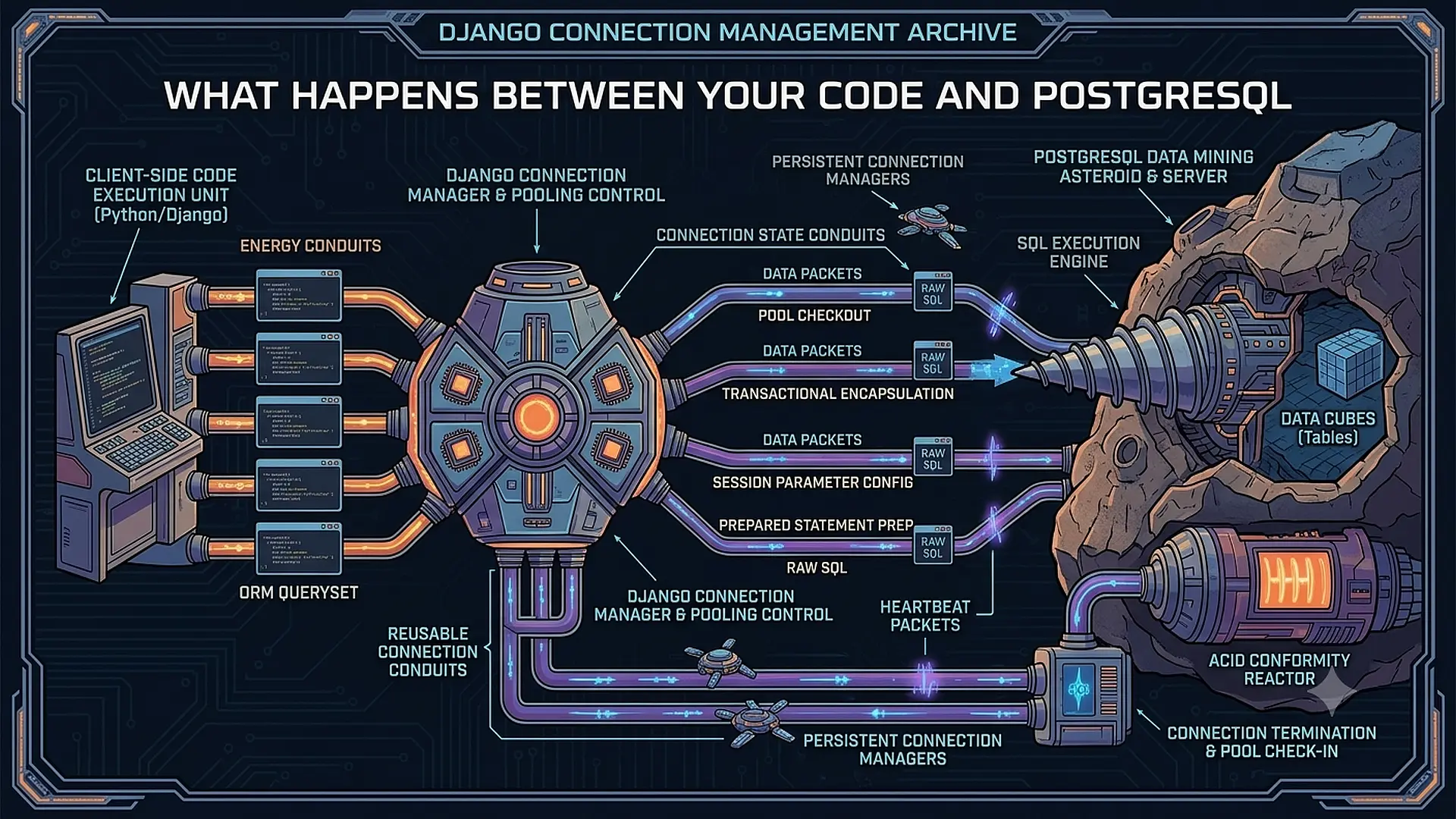
Part 3 of the “Django Under the Hood” series — deep dives into Django’s internals, edge cases, and the mechanics that separate production-grade applications from tutorial code.
User.objects.get(id=1)
This line needs a database connection. But you didn’t open one. You won’t close one. Django handles it.
How?
Most developers never ask. The database “just works.” Until you see FATAL: too many connections in production logs at 3.07AM. Or transactions that should have rolled back didn't. Or connections that should be reused aren't.
Django’s database layer is more complex than it appears. Thread-local connections, automatic transaction management, connection health checking, and the new Django 5.1 persistent connection pools — there’s an entire subsystem running beneath every query.
Let’s trace what happens from Model.objects.get() to the PostgreSQL wire protocol.
The Connection Wrapper: DatabaseWrapper
Every database backend is a DatabaseWrapper:
# django/db/backends/postgresql/base.py
class DatabaseWrapper(BaseDatabaseWrapper):
    vendor = 'postgresql'
    display_name = 'PostgreSQL'

    # The actual connection object (psycopg2/psycopg3)
    connection = None
When you access the database, Django uses a wrapper from the connections object:
# django/db/__init__.py
from django.db.utils import ConnectionHandler

connections = ConnectionHandler()

# Default connection alias
DEFAULT_DB_ALIAS = 'default'
ConnectionHandler is a dictionary-like object that creates wrappers on demand:
# django/db/utils.py
class ConnectionHandler:
    def __init__(self, databases=None):
        self._databases = databases
        self._connections = local()  # Thread-local storage!

    def __getitem__(self, alias):
        if hasattr(self._connections, alias):
            return getattr(self._connections, alias)

        # Create new wrapper for this thread
        conn = self.create_connection(alias)
        setattr(self._connections, alias, conn)
        return conn
Critical insight: self._connections = local() — connections are thread-local. Each thread gets its own connection wrapper, its own database connection.
Thread-Local Connections: Why It Matters
from threading import local

class ConnectionHandler:
    def __init__(self):
        self._connections = local()
threading.local() creates an object where attributes are thread-specific:
# Thread 1
connections['default']  # Creates connection A

# Thread 2
connections['default']  # Creates connection B (different!)

# Thread 1 again
connections['default']  # Returns connection A (same as before)
Gunicorn with sync workers: Each worker is a process. Each process has one thread. One connection per worker.
Gunicorn with gthread workers: Each worker has multiple threads. Multiple connections per worker (one per thread).
ASGI (Uvicorn): Single thread, but async. Connections can be shared across coroutines — but Django’s ORM isn’t fully async, so it uses a thread pool internally.
Connection Lifecycle: Open, Use, Close
Opening a Connection
Connections are lazy. The wrapper exists, but the actual database connection opens on first use:
# django/db/backends/base/base.py
class BaseDatabaseWrapper:
    def ensure_connection(self):
        if self.connection is None:
            with self.wrap_database_errors:
                self.connect()

    def connect(self):
        # Get connection parameters
        conn_params = self.get_connection_params()

        # Actually connect to database
        self.connection = self.get_new_connection(conn_params)

        # Post-connection setup
        self.init_connection_state()

        # Run connection callbacks
        connection_created.send(sender=self.__class__, connection=self)
For PostgreSQL:
# django/db/backends/postgresql/base.py
class DatabaseWrapper(BaseDatabaseWrapper):
    def get_new_connection(self, conn_params):
        # Using psycopg (v3) or psycopg2
        connection = self.Database.connect(**conn_params)
        return connection

    def init_connection_state(self):
        # Set timezone
        self.connection.set_client_encoding('UTF8')

        # Set default isolation level
        self.set_autocommit(self.settings_dict['AUTOCOMMIT'])
Using a Connection
When you execute a query, Django ensures the connection is open:
class BaseDatabaseWrapper:
    def cursor(self):
        self.ensure_connection()
        return self._cursor()

    def _cursor(self):
        return self.create_cursor(name=None)
The cursor is what actually executes SQL:
cursor = connection.cursor()
cursor.execute("SELECT * FROM users WHERE id = %s", [1])
row = cursor.fetchone()
Closing a Connection
Connections close in several scenarios:
1. Request ends (with CONN_MAX_AGE=0)
# django/db/__init__.py
def close_old_connections(**kwargs):
    for conn in connections.all():
        conn.close_if_unusable_or_obsolete()

# Connected to signals
signals.request_started.connect(close_old_connections)
signals.request_finished.connect(close_old_connections)
2. Connection is too old
class BaseDatabaseWrapper:
    def close_if_unusable_or_obsolete(self):
        if self.connection is not None:
            # Check if connection is still valid
            if self.errors_occurred:
                self.close()
            # Check age
            elif self.close_at is not None and time.monotonic() >= self.close_at:
                self.close()
3. Explicitly closed
from django.db import connection
connection.close()
CONN_MAX_AGE: The Persistence Setting
# settings.py
DATABASES = {
    'default': {
        'ENGINE': 'django.db.backends.postgresql',
        'CONN_MAX_AGE': 600,  # Keep connection for 10 minutes
        # ...
    }
}
What CONN_MAX_AGE actually does:
class BaseDatabaseWrapper:
    @property
    def close_at(self):
        if self.settings_dict['CONN_MAX_AGE'] is None:
            return None  # Never close (persistent)

        if self.settings_dict['CONN_MAX_AGE'] == 0:
            return -1  # Close immediately after request

        # Close after CONN_MAX_AGE seconds
        return self._created_at + self.settings_dict['CONN_MAX_AGE']
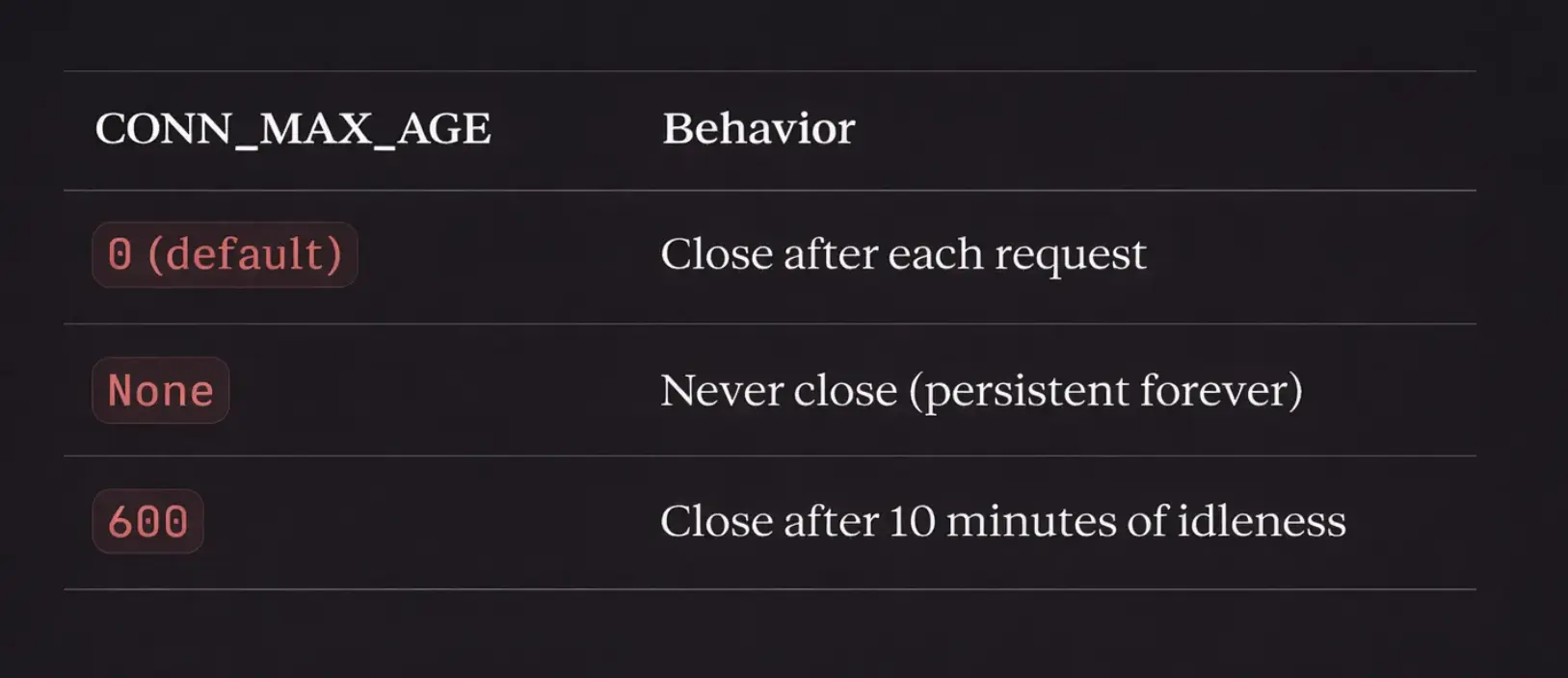
The trap: CONN_MAX_AGE=None sounds efficient, but connections can go stale (database restarts, network issues). Always use a finite value or connection pooling.
Django 5.1 Connection Pooling
Django 5.1 added native connection pooling for PostgreSQL using psycopg3:
# settings.py
DATABASES = {
    'default': {
        'ENGINE': 'django.db.backends.postgresql',
        'OPTIONS': {
            'pool': {
                'min_size': 2,
                'max_size': 10,
                'timeout': 30,
            }
        },
    }
}
How it works internally:
# django/db/backends/postgresql/base.py
class DatabaseWrapper(BaseDatabaseWrapper):
    def get_new_connection(self, conn_params):
        pool_options = self.settings_dict['OPTIONS'].get('pool')

        if pool_options:
            # Get or create pool for this configuration
            pool = self._get_pool(pool_options)

            # Get connection from pool (blocks if exhausted)
            connection = pool.getconn()
        else:
            # Direct connection (old behavior)
            connection = self.Database.connect(**conn_params)

        return connection

    def close(self):
        if self.connection is not None:
            if hasattr(self, '_pool'):
                # Return to pool instead of closing
                self._pool.putconn(self.connection)
            else:
                self.connection.close()

            self.connection = None
Pool per process: Each Django process maintains its own pool. With 4 Gunicorn workers and max_size=10, you have up to 40 PostgreSQL connections total.
Transactions: Autocommit and Atomic
Autocommit Mode
By default, Django runs in autocommit mode:
class BaseDatabaseWrapper:
    def _set_autocommit(self, autocommit):
        self.connection.autocommit = autocommit
In autocommit mode, each query is its own transaction:
-- Query 1: auto-committed
INSERT INTO users (name) VALUES ('Alice');
-- Immediately visible to other connections

-- Query 2: auto-committed
INSERT INTO users (name) VALUES ('Bob');
-- Immediately visible
transaction.atomic()
atomic() disables autocommit temporarily:
from django.db import transaction

with transaction.atomic():
    User.objects.create(name='Alice')
    User.objects.create(name='Bob')
    # Both committed together at the end
What happens internally:
# django/db/transaction.py
class Atomic:
    def __enter__(self):
        connection = get_connection(self.using)

        if connection.in_atomic_block:
            # Nested atomic: create savepoint
            self.savepoint_id = connection.savepoint()
        else:
            # Start transaction
            connection.set_autocommit(False)
            connection.in_atomic_block = True

    def __exit__(self, exc_type, exc_value, traceback):
        if exc_type is None:
            # Success: commit or release savepoint
            if self.savepoint_id:
                connection.savepoint_commit(self.savepoint_id)
            else:
                connection.commit()
                connection.set_autocommit(True)
        else:
            # Exception: rollback
            if self.savepoint_id:
                connection.savepoint_rollback(self.savepoint_id)
            else:
                connection.rollback()
                connection.set_autocommit(True)
Nested Atomics = Savepoints
with transaction.atomic():           # BEGIN
    User.objects.create(name='Alice')

    with transaction.atomic():       # SAVEPOINT s1
        User.objects.create(name='Bob')
        raise ValueError()           # ROLLBACK TO SAVEPOINT s1

    # Alice still exists, Bob doesn't
# COMMIT (Alice is saved)
The SQL:
BEGIN;
INSERT INTO users (name) VALUES ('Alice');
SAVEPOINT s1;
INSERT INTO users (name) VALUES ('Bob');
ROLLBACK TO SAVEPOINT s1;
COMMIT;
The Dangerous connection.cursor()
from django.db import connection

with connection.cursor() as cursor:
    cursor.execute("UPDATE users SET active = true WHERE id = %s", [1])
This bypasses Django’s transaction management in subtle ways:
# You might expect this to rollback on exception
try:
    with connection.cursor() as cursor:
        cursor.execute("INSERT INTO users (name) VALUES ('Alice')")
        raise ValueError("Oops")
except ValueError:
    pass

# But in autocommit mode, Alice is already committed!
Safe pattern:
from django.db import connection, transaction

with transaction.atomic():
    with connection.cursor() as cursor:
        cursor.execute("INSERT INTO users (name) VALUES ('Alice')")
        raise ValueError("Oops")
# Now it properly rolls back
Connection Health Checking
Connections can die: network issues, database restarts, idle timeouts.
Django 4.1+ Health Checks
# settings.py
DATABASES = {
    'default': {
        'CONN_HEALTH_CHECKS': True,  # New in Django 4.1
        # ...
    }
}
What it does:
class BaseDatabaseWrapper:
    def ensure_connection(self):
        if self.connection is not None:
            if self.settings_dict['CONN_HEALTH_CHECKS']:
                if not self.is_usable():
                    self.close()

        if self.connection is None:
            self.connect()

    def is_usable(self):
        try:
            # Execute a simple query
            self.connection.cursor().execute("SELECT 1")
            return True
        except DatabaseError:
            return False
Cost: One extra query (SELECT 1) per request when reusing connections. Worth it to avoid cryptic errors.
Multiple Databases
# settings.py
DATABASES = {
    'default': {
        'ENGINE': 'django.db.backends.postgresql',
        'NAME': 'primary_db',
    },
    'replica': {
        'ENGINE': 'django.db.backends.postgresql',
        'NAME': 'replica_db',
    },
}
Accessing specific databases:
# Using QuerySet
User.objects.using('replica').all()

# Using router
class ReplicaRouter:
    def db_for_read(self, model, **hints):
        return 'replica'

    def db_for_write(self, model, **hints):
        return 'default'
Each database has its own connection wrapper, its own thread-local storage, its own pool:
connections['default']  # ConnectionWrapper for primary_db
connections['replica']  # ConnectionWrapper for replica_db
Cross-Database Transactions
This doesn’t work as expected:
with transaction.atomic():
    User.objects.create(name='Alice')  # default db
    AuditLog.objects.using('audit').create(action='created user')  # audit db
    raise ValueError()
# Only 'default' rolls back! 'audit' has its own transaction.
For true distributed transactions, you need two-phase commit (2PC) — which Django doesn’t support natively.
Connection Signals
Django provides hooks into the connection lifecycle:
from django.db.backends.signals import connection_created

def setup_postgres(sender, connection, **kwargs):
    if connection.vendor == 'postgresql':
        with connection.cursor() as cursor:
            cursor.execute("SET statement_timeout = '30s'")

connection_created.connect(setup_postgres)
Available signals:
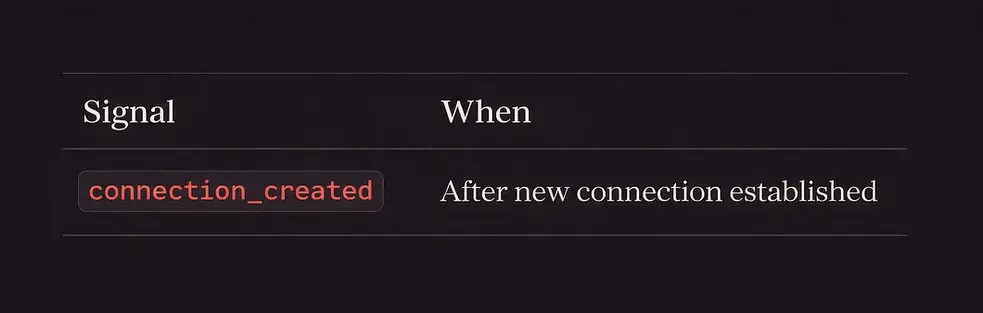
Note: There’s no connection_closed signal. If you need cleanup, use atexit or middleware.
Debugging Connection Issues
See Active Connections
from django.db import connections

for alias in connections:
    conn = connections[alias]
    print(f"{alias}: connected={conn.connection is not None}")
PostgreSQL: Check from Database Side
SELECT pid, usename, application_name, client_addr, state, query
FROM pg_stat_activity
WHERE datname = 'your_database';
Log All Queries
# settings.py
LOGGING = {
    'handlers': {
        'console': {
            'class': 'logging.StreamHandler',
        },
    },
    'loggers': {
        'django.db.backends': {
            'level': 'DEBUG',
            'handlers': ['console'],
        },
    },
}
Output:
(0.001) SELECT "users"."id", "users"."name" FROM "users" WHERE "users"."id" = 1; args=[1]
Connection Age Tracking
from django.db import connection
import time

# When was connection created?
if connection.connection:
    age = time.monotonic() - connection._created_at
    print(f"Connection age: {age:.1f} seconds")
Common Issues and Fixes
Issue 1: “Too Many Connections”
Cause: Each thread/process opens connections, but they’re not being closed.
Fix:
# Option 1: Close after each request
DATABASES = {
    'default': {
        'CONN_MAX_AGE': 0,  # Default, but explicit
    }
}

# Option 2: Limit pool size
DATABASES = {
    'default': {
        'OPTIONS': {
            'pool': {'max_size': 5},  # Django 5.1+
        }
    }
}

# Option 3: Use PgBouncer
# Configure Django to connect to PgBouncer instead
Issue 2: Connection Dropped Mid-Request
Cause: Database restarted, network blip, idle timeout.
Fix:
DATABASES = {
    'default': {
        'CONN_HEALTH_CHECKS': True,  # Django 4.1+
        'CONN_MAX_AGE': 300,  # Recycle every 5 minutes
    }
}
Issue 3: Transactions Not Rolling Back
Cause: Using raw cursors outside atomic blocks (autocommit mode).
Fix:
# Always wrap raw SQL in atomic
with transaction.atomic():
    with connection.cursor() as cursor:
        cursor.execute("DELETE FROM users WHERE id = %s", [1])
Issue 4: “Database is locked” (SQLite)
Cause: Multiple threads/processes accessing SQLite simultaneously.
Fix: SQLite isn’t meant for concurrent access. Use PostgreSQL in production.
# If you must use SQLite with threads
DATABASES = {
    'default': {
        'ENGINE': 'django.db.backends.sqlite3',
        'OPTIONS': {
            'timeout': 20,  # Wait 20 seconds for lock
        }
    }
}
The Connection Lifecycle Visualized
Request Starts
     ↓
connections['default'] accessed
     ↓
Thread-local lookup → Miss
     ↓
Create DatabaseWrapper
     ↓
First query → ensure_connection()
     ↓
is_usable() check (if CONN_HEALTH_CHECKS)
     ↓
connect() → PostgreSQL handshake
     ↓
connection_created signal
     ↓
Queries execute on connection
     ↓
Request Ends
     ↓
close_old_connections signal handler
     ↓
CONN_MAX_AGE check
     ↓
Close or keep for reuse
What’s Next
This was connection management — from thread-local storage to health checks.
Next in the series: Signal Dispatch Internals — how Django’s signal system works, the receiver registry, weak references, and why signals can silently fail.
Series: Django Under the Hood
- What Actually Happens When a Request Hits Your Server
- The ORM Query Compiler
- Connection Management and the Database Wrapper ← You are here
- Signal Dispatch Internals (coming next)
- Template Engine Compilation
- Form and Validation Pipeline
- Authentication Backend Chain
- Static Files and WhiteNoise Internals
- Migration System Deep Dive
- Test Client and Request Factory Mechanics