Django Under Hood #01: Django Request/Response lifecycle - What Actually Happens When a Request Hits Your Server
This is the first article in the “Django Under the Hood” series — 10 deep dives into Django’s internals, edge cases, and the mechanics that separate production-grade applications from tutorial code.
What happens in the 47 milliseconds between a request arriving at your server and your view function executing? What code runs? What objects are created? What decisions are made before you even see the request?
Most Django developers never look. The framework “just works.”
Until it doesn’t.
Understanding Django’s internals isn’t academic. It’s the difference between debugging for 10 minutes versus 10 hours. It’s knowing exactly where to hook into the framework. It’s writing middleware that doesn’t accidentally break everything.
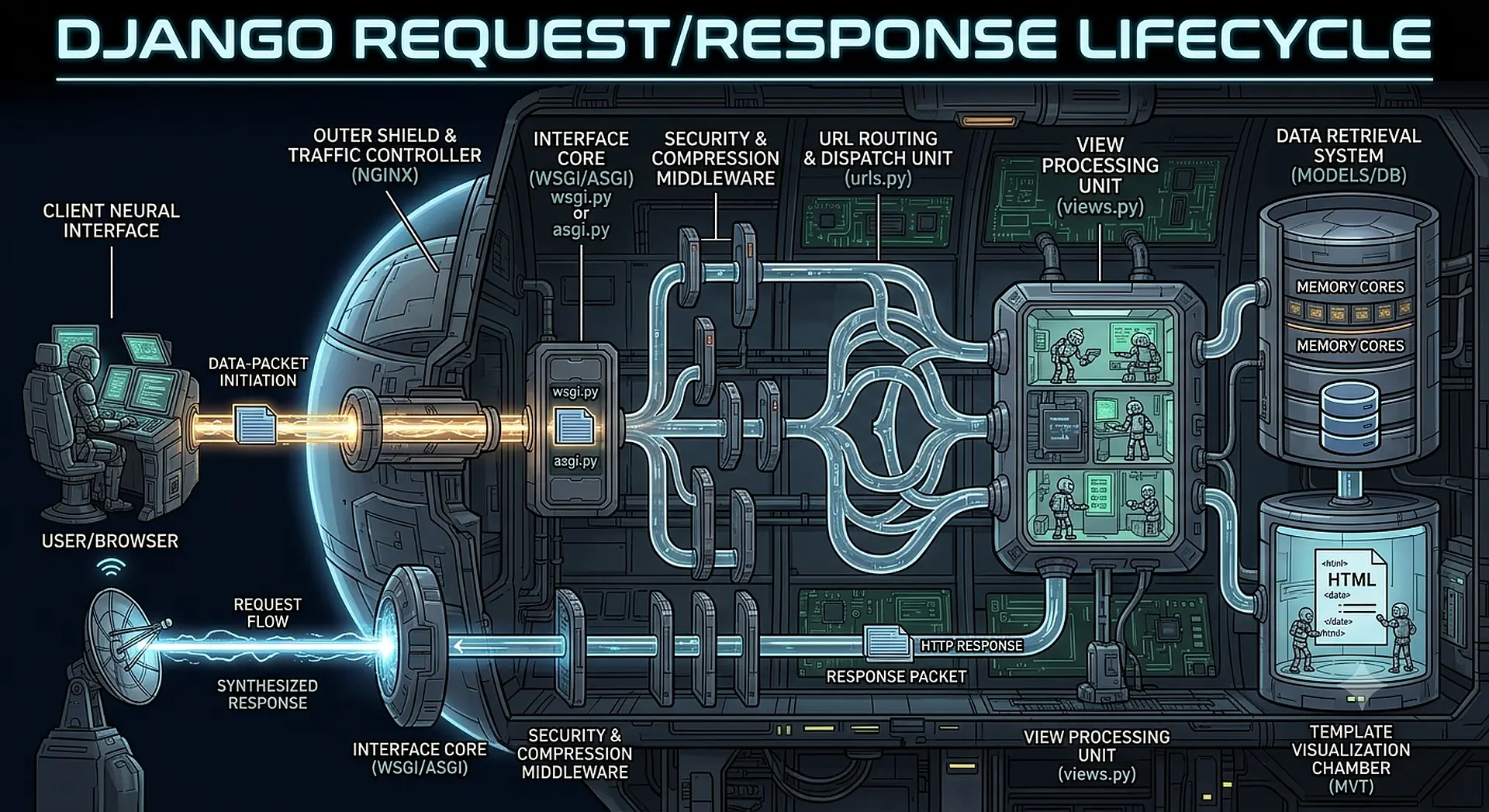
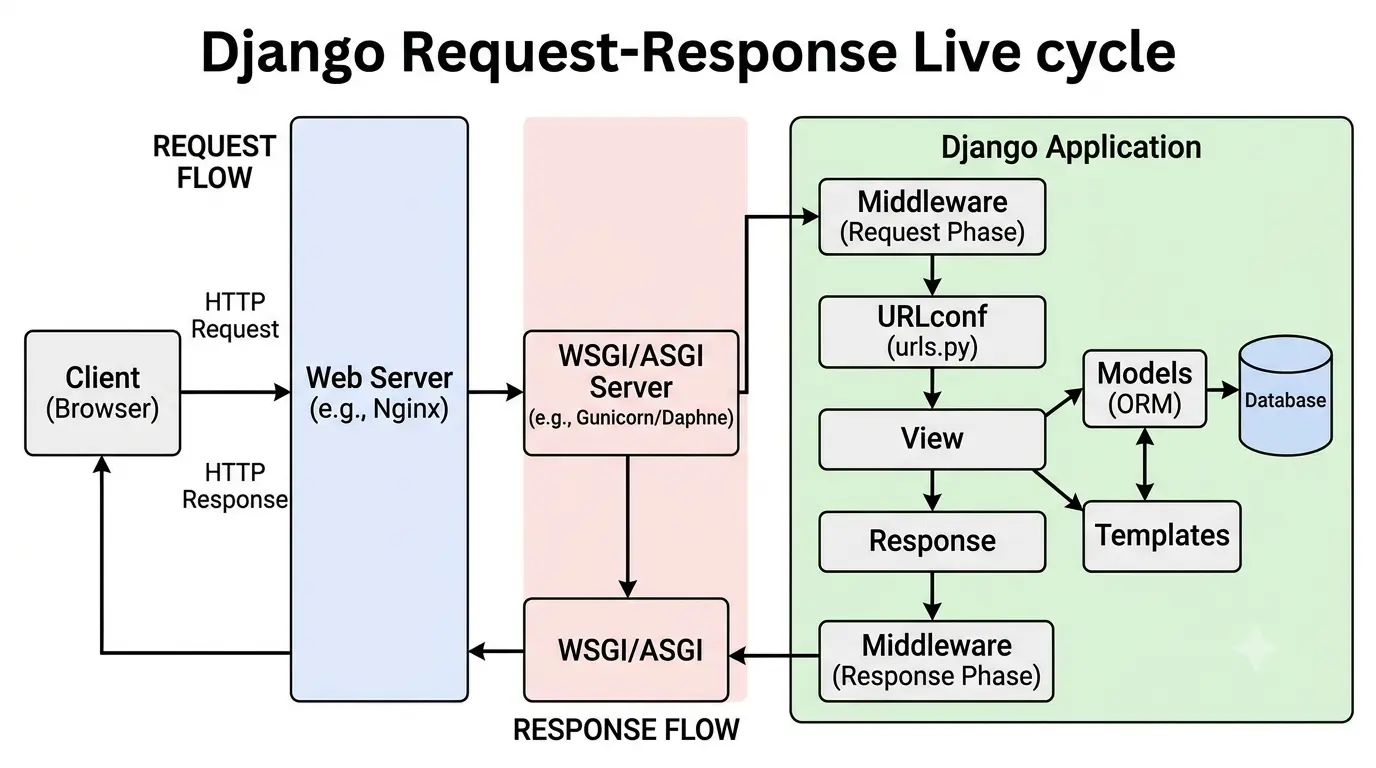
Let’s trace a single HTTP request through Django’s internals — from raw bytes on the socket to your view’s return statement.
The Entry Point: WSGI vs ASGI
Your request doesn’t start in Django. It starts in your application server.
WSGI (Gunicorn, uWSGI)
# What Gunicorn calls
from config.wsgi import application

# config/wsgi.py
application = get_wsgi_application()
When a request arrives, Gunicorn calls application(environ, start_response). The environ dict contains everything — headers, path, query string, body — as raw data.
# What environ looks like
{
    'REQUEST_METHOD': 'POST',
    'PATH_INFO': '/api/users/',
    'QUERY_STRING': 'active=true',
    'CONTENT_TYPE': 'application/json',
    'CONTENT_LENGTH': '42',
    'HTTP_AUTHORIZATION': 'Bearer xxx',
    'HTTP_X_REQUEST_ID': 'abc-123',
    'wsgi.input': <socket file>,
    # ... 30+ more keys
}
ASGI (Uvicorn, Daphne)
# Async entry point
from config.asgi import application

# config/asgi.py
application = get_asgi_application()
ASGI passes a scope dict plus receive and send callables:
# ASGI scope
{
    'type': 'http',
    'asgi': {'version': '3.0'},
    'http_version': '1.1',
    'method': 'POST',
    'path': '/api/users/',
    'query_string': b'active=true',
    'headers': [
        (b'content-type', b'application/json'),
        (b'authorization', b'Bearer xxx'),
    ],
}
The key difference: WSGI is synchronous. One request, one thread, blocked until complete. ASGI is asynchronous. One thread can handle many concurrent requests.
WSGIHandler: Where Django Takes Over
# django/core/handlers/wsgi.py
class WSGIHandler(base.BaseHandler):
    request_class = WSGIRequest

    def __call__(self, environ, start_response):
        # 1. Load middleware (once, on first request)
        set_script_prefix(get_script_name(environ))
        signals.request_started.send(sender=self.__class__, environ=environ)

        # 2. Create request object
        request = self.request_class(environ)

        # 3. Get response through middleware chain
        response = self.get_response(request)

        # ... send response back
Three things happen here:
- Signal fires:
request_started— your first hook into the request - Request object created: Raw
environbecomesHttpRequest - Middleware chain executes: The heart of Django’s request handling
HttpRequest: The Object You Think You Know
request = WSGIRequest(environ)
This single line does more than you’d expect:
# django/http/request.py
class HttpRequest:
    def __init__(self):
        self.GET = QueryDict()      # Not populated yet
        self.POST = QueryDict()     # Not populated yet
        self.COOKIES = {}
        self.META = {}
        self.FILES = MultiValueDict()
        self.path = ''
        self.method = None
        self.content_type = None
        self.content_params = None
        self._stream = None         # Raw body, not read yet
        self._read_started = False
Critical insight: request.body, request.POST, and request.FILES are lazy. They don't read the socket until you access them.
# This doesn't read the body
request = WSGIRequest(environ)

# This reads the entire body into memory
body = request.body

# After this, you can't read again
request._read_started = True
This is why middleware order matters. If middleware A reads request.body, and middleware B tries to read request.POST, you'll get an empty dict — the stream is already consumed.
Django 4.0+ Fix: request.body is now cached. Read it multiple times safely.
# Before Django 4.0: broken
body1 = request.body  # Works
body2 = request.body  # Empty!

# Django 4.0+: fixed
body1 = request.body  # Works
body2 = request.body  # Same content
The Middleware Chain: Not What You Think
You configure middleware as a list:
MIDDLEWARE = [
    'django.middleware.security.SecurityMiddleware',
    'django.contrib.sessions.middleware.SessionMiddleware',
    'django.middleware.common.CommonMiddleware',
    'django.middleware.csrf.CsrfViewMiddleware',
    'django.contrib.auth.middleware.AuthenticationMiddleware',
    'django.contrib.messages.middleware.MessageMiddleware',
    'myapp.middleware.CustomMiddleware',
]
But Django doesn’t iterate through this list. It builds a chain of handlers at startup:
# django/core/handlers/base.py
def load_middleware(self, is_async=False):
    handler = self._get_response  # Your view

    # Build chain in REVERSE order
    for middleware_path in reversed(settings.MIDDLEWARE):
        middleware = import_string(middleware_path)
        handler = middleware(handler)  # Wraps previous handler

    self._middleware_chain = handler
Visualized:
Request → SecurityMiddleware → SessionMiddleware → ... → View
                                                          ↓
Response ← SecurityMiddleware ← SessionMiddleware ← ... ← View
Each middleware wraps the next. When you call get_response(request), you're not calling your view — you're calling the next middleware, which eventually calls your view.
This explains everything about middleware behavior:
- Why order matters (outer middlewares see request first, response last)
- Why exceptions propagate outward
- Why a middleware can short-circuit the entire chain
The Five Middleware Hooks
class MyMiddleware:
    def __init__(self, get_response):
        self.get_response = get_response
        # One-time setup (server start)

    def __call__(self, request):
        # 1. Before view (every request)
        self.process_request(request)

        response = self.get_response(request)

        # 2. After view (every response)
        self.process_response(request, response)

        return response

    def process_view(self, request, view_func, view_args, view_kwargs):
        # 3. After URL resolution, before view execution
        # Return None to continue, or HttpResponse to short-circuit
        pass

    def process_exception(self, request, exception):
        # 4. Only if view raises exception
        # Return None to propagate, or HttpResponse to handle
        pass

    def process_template_response(self, request, response):
        # 5. Only if response has render() method (TemplateResponse)
        # Must return a response object
        return response
Hook execution order for a normal request:
1. Middleware A: __call__ (before get_response)
2. Middleware B: __call__ (before get_response)
3. Middleware C: __call__ (before get_response)
4. URL Resolution
5. Middleware A: process_view
6. Middleware B: process_view
7. Middleware C: process_view
8. View executes
9. Middleware C: process_template_response (if applicable)
10. Middleware B: process_template_response (if applicable)
11. Middleware A: process_template_response (if applicable)
12. Middleware C: __call__ (after get_response)
13. Middleware B: __call__ (after get_response)
14. Middleware A: __call__ (after get_response)
Notice: process_view runs in forward order. process_template_response runs in reverse.
URL Resolution: The Router Nobody Calls a Router
# django/urls/resolvers.py
resolver = URLResolver(pattern, urlconf_name)
match = resolver.resolve(request.path_info)
Django’s URL resolver is a tree of URLPattern and URLResolver objects, built at startup from your urlpatterns.
# Your urls.py
urlpatterns = [
    path('api/', include('api.urls')),
    path('admin/', admin.site.urls),
]

# Becomes a tree:
# URLResolver('^api/')
#   └── URLPattern('^users/$', views.user_list)
#   └── URLPattern('^users/(?P<pk>\d+)/$', views.user_detail)
# URLResolver('^admin/')
#   └── ...
Resolution walks this tree depth-first until a pattern matches:
class ResolverMatch:
    def __init__(self, ...):
        self.func = view_function       # The view to call
        self.args = ()                  # Positional arguments
        self.kwargs = {'pk': '42'}      # Keyword arguments
        self.url_name = 'user-detail'   # Reverse URL name
        self.app_names = ['api']        # App namespaces
        self.namespaces = ['api', 'v1'] # Full namespace chain
        self.route = 'api/users/<pk>/'  # Matched route
Performance note: URL resolution is cached per-thread. The first request builds the tree; subsequent requests reuse it.
# django/urls/resolvers.py
@functools.lru_cache(maxsize=None)
def _get_cached_resolver():
    return URLResolver(...)
This is why URL changes require a server restart in production.
View Execution: The Part You Know
Finally, your view:
# django/core/handlers/base.py
def _get_response(self, request):
    # URL already resolved
    callback, callback_args, callback_kwargs = resolver_match

    # Apply view middleware
    for middleware in self._view_middleware:
        response = middleware(request, callback, callback_args, callback_kwargs)
        if response:
            return response  # Short-circuit

    # Call the view
    response = callback(request, *callback_args, **callback_kwargs)

    return response
But wait — what if your view is a class?
class UserView(View):
    def get(self, request, pk):
        ...
Class-based views have a secret: as_view() returns a function.
# django/views/generic/base.py
class View:
    @classmethod
    def as_view(cls, **initkwargs):
        def view(request, *args, **kwargs):
            self = cls(**initkwargs)  # New instance per request
            self.setup(request, *args, **kwargs)
            return self.dispatch(request, *args, **kwargs)
        return view

    def dispatch(self, request, *args, **kwargs):
        handler = getattr(self, request.method.lower(), self.http_method_not_allowed)
        return handler(request, *args, **kwargs)
Key insight: A new view instance is created for every request. Class attributes persist; instance attributes don’t.
class BrokenView(View):
    items = []  # SHARED across all requests!

    def get(self, request):
        self.items.append(request.user.id)  # Memory leak + race condition
Response: More Than a String
Your view returns HttpResponse. But what happens to it?
# django/http/response.py
class HttpResponse:
    streaming = False

    def __init__(self, content=b'', content_type=None, status=200):
        self._headers = {}  # Case-insensitive dict
        self._charset = settings.DEFAULT_CHARSET
        self.cookies = SimpleCookie()
        self._reason_phrase = None
        self.content = content  # Calls setter

    @property
    def content(self):
        return b''.join(self._container)

    @content.setter
    def content(self, value):
        # Handles str, bytes, iterables
        self._container = [self.make_bytes(value)]
StreamingHttpResponse is different:
class StreamingHttpResponse(HttpResponseBase):
    streaming = True

    def __init__(self, streaming_content=(), ...):
        self.streaming_content = streaming_content  # Generator

    @property
    def content(self):
        # Forces evaluation - defeats the purpose!
        raise AttributeError("...")
When you return a StreamingHttpResponse, Django never loads the full content into memory. It passes the generator directly to the WSGI server.
But middleware can break this:
class BrokenMiddleware:
    def __call__(self, request):
        response = self.get_response(request)

        # This breaks streaming!
        if 'error' in response.content.decode():  # Forces full read
            return HttpResponse('Error occurred')

        return response
Exception Handling: The Hidden Safety Net
What if your view raises an exception?
# django/core/handlers/base.py
def _get_response(self, request):
    try:
        response = view(request, *args, **kwargs)
    except Exception as exc:
        response = self.process_exception_by_middleware(exc, request)
        if response is None:
            raise  # No middleware handled it
    return response
Unhandled exceptions trigger Django’s exception handling:
# django/core/handlers/exception.py
def convert_exception_to_response(get_response):
    @wraps(get_response)
    def inner(request):
        try:
            response = get_response(request)
        except Exception as exc:
            response = response_for_exception(request, exc)
        return response
    return inner
Exception → Response mapping:
Press enter or click to view image in full size
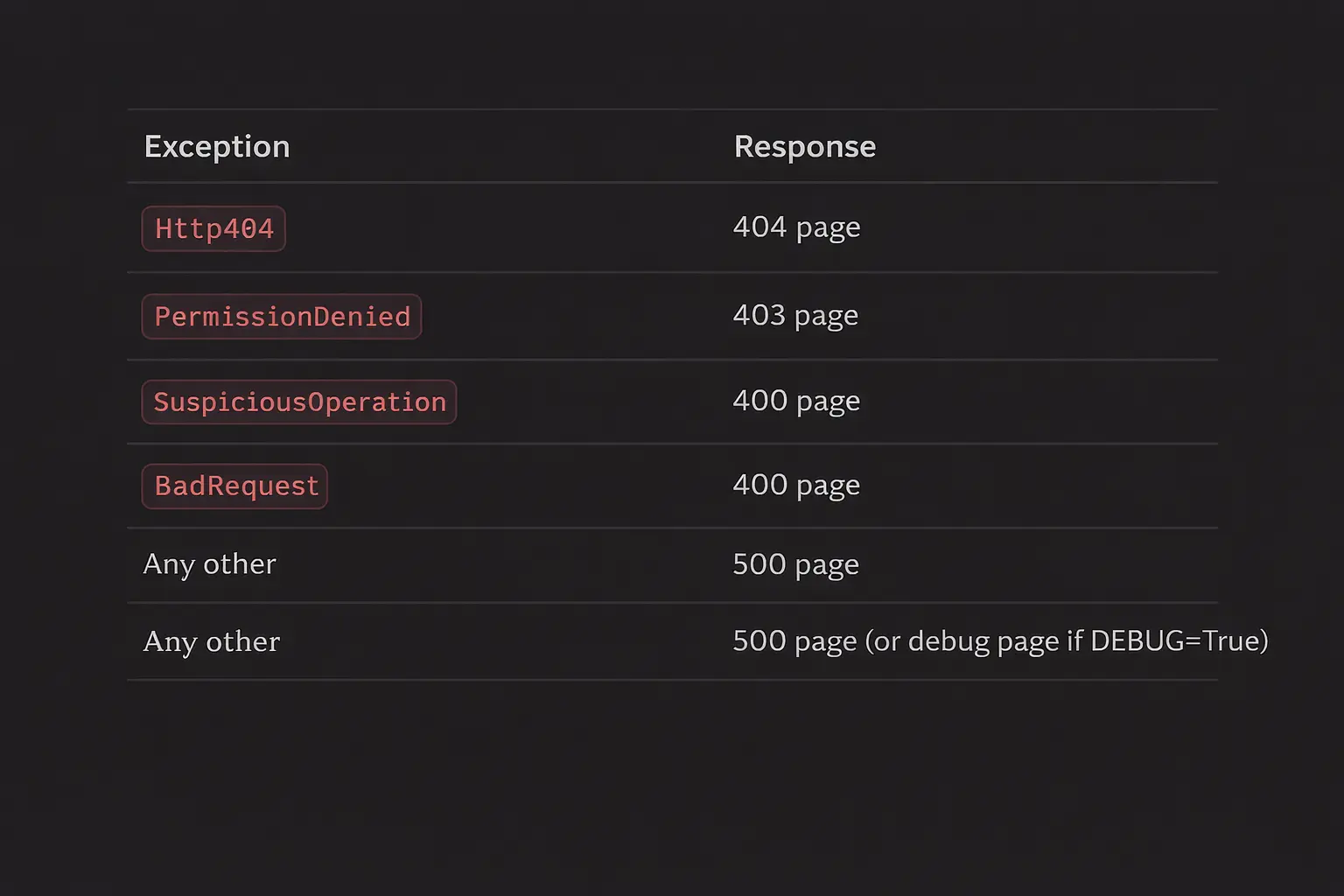
The debug page reads your source files at runtime:
# django/views/debug.py
def get_traceback_frames(self):
    for frame in traceback.extract_tb(self.exc_traceback):
        filename = frame.filename
        lineno = frame.lineno

        # Actually reads your source file!
        with open(filename, 'rb') as f:
            source = f.read().decode('utf-8')
This is why the debug page shows your code with syntax highlighting — it’s reading it live.
The 47 Milliseconds Breakdown
For a typical request:
Press enter or click to view image in full size
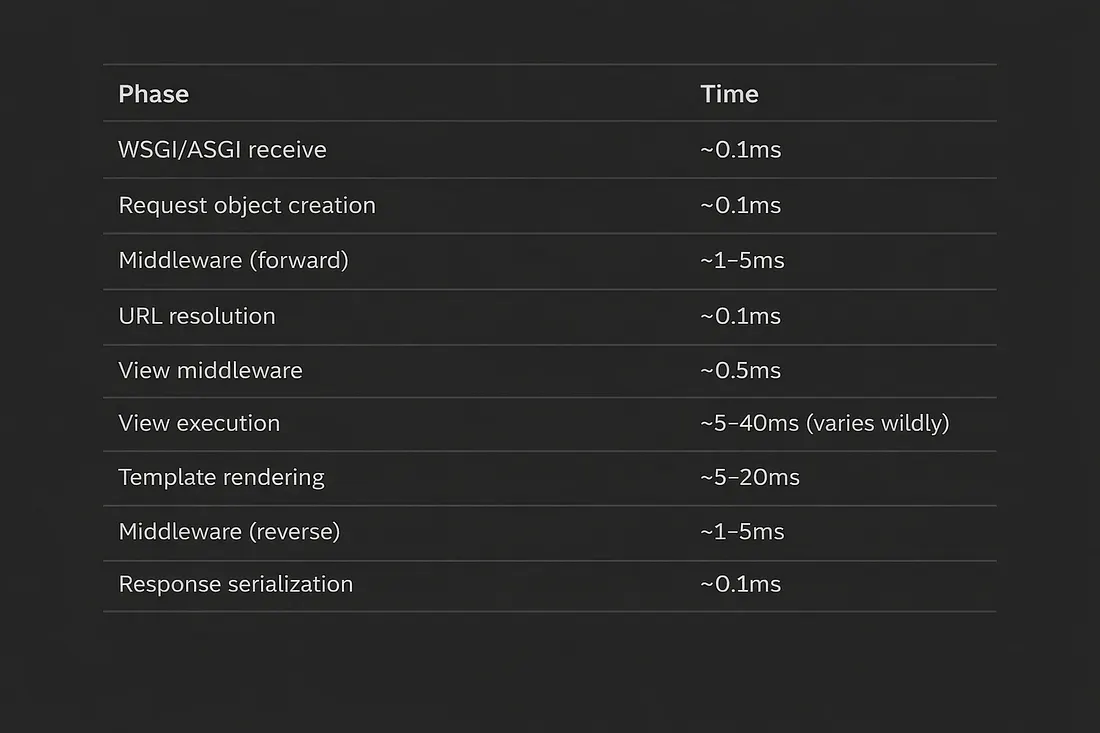
The view and template are where your code runs. Everything else is framework overhead — usually under 10ms total.
Practical Applications
1. Request timing middleware that actually works:
import time

class TimingMiddleware:
    def __init__(self, get_response):
        self.get_response = get_response

    def __call__(self, request):
        request._start_time = time.perf_counter()
        response = self.get_response(request)
        duration = time.perf_counter() - request._start_time
        response['X-Request-Duration'] = f'{duration:.4f}s'
        return response
2. Early termination for health checks (skip all middleware):
# Place first in MIDDLEWARE
class HealthCheckMiddleware:
    def __init__(self, get_response):
        self.get_response = get_response

    def __call__(self, request):
        if request.path == '/health/':
            return HttpResponse('OK')  # Skip everything
        return self.get_response(request)
3. Request ID propagation:
import uuid

class RequestIDMiddleware:
    def __init__(self, get_response):
        self.get_response = get_response

    def __call__(self, request):
        request.id = request.headers.get('X-Request-ID', str(uuid.uuid4()))
        response = self.get_response(request)
        response['X-Request-ID'] = request.id
        return response
What’s Next
This was the request lifecycle—the path from raw bytes to rendered response.
Next in the series: Django’s ORM Query Compiler—what happens between Model.objects.filter() and the SQL that hits your database. The query planner, lazy evaluation, and why some querysets explode in production.
Series: Django Under the Hood
- What Actually Happens When a Request Hits Your Server ← You are here
- The ORM Query Compiler (coming next)
- Connection Management and the Database Wrapper
- Signal Dispatch Internals
- Template Engine Compilation
- Form and Validation Pipeline
- Authentication Backend Chain
- Static Files and WhiteNoise Internals
- Migration System Deep Dive
- Test Client and Request Factory Mechanics